

ActivityLog Contact us
Use cases · Change control Delivery and change

Every change, who approved it, and when it shipped

ActivityLog follows each change from pull request to production. You see who made it, who approved it, and which changes skipped review, without stitching reports together by hand.

For you

Your changes in one place

Your pull requests, builds and deploys for the week, with the reviewers who signed off on each.

My changes, and the ones that skipped review

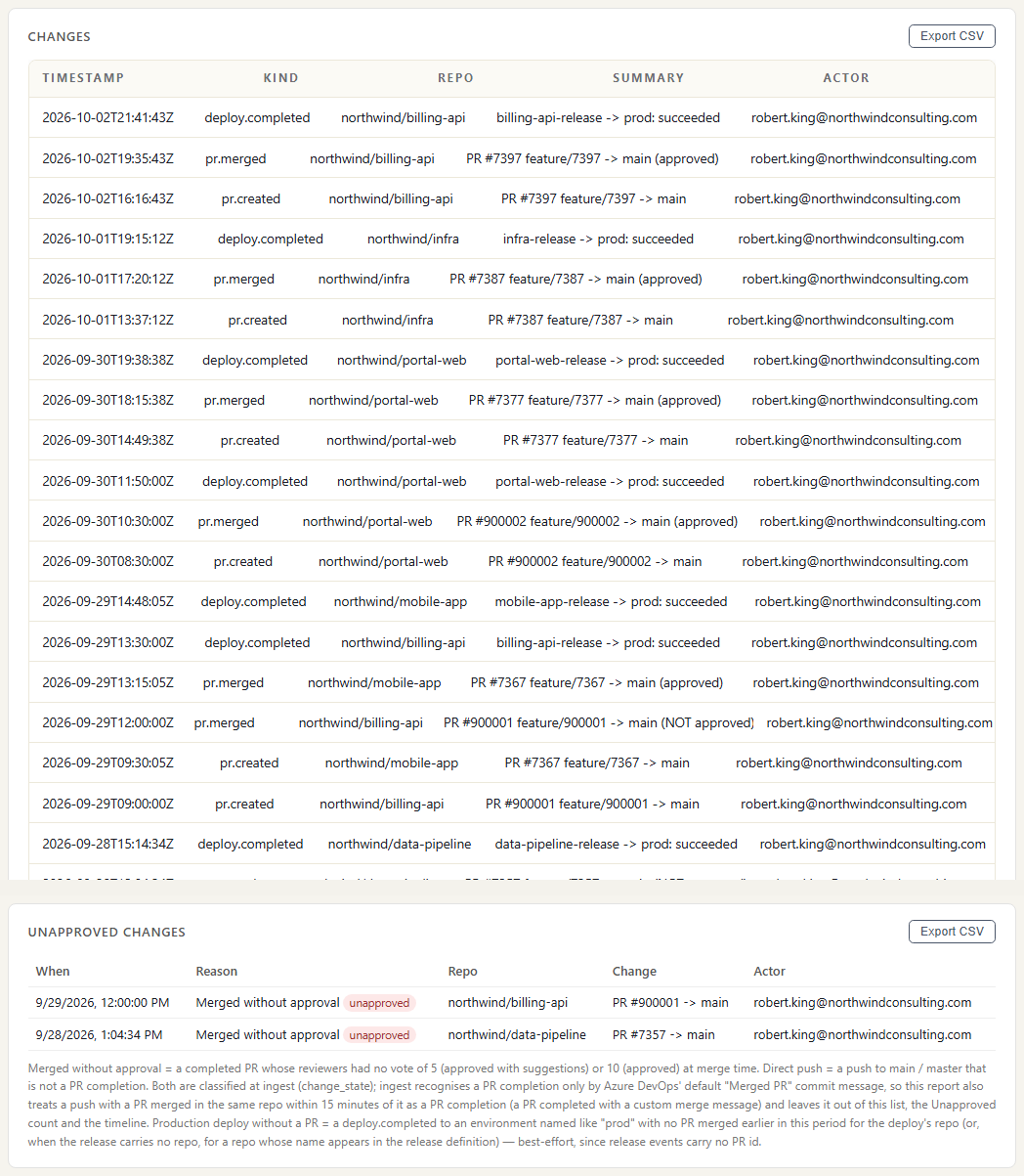
The changes list filtered to Robert King for the week: his pull requests and production deploys from Azure DevOps, with any unapproved change listed on its own. Tuesday's merge is there because no reviewer voted to approve it. Open a row to see who reviewed a change and how they voted.

My changes, and the ones that skipped review

My week of changes by day

Robert's pull requests, pushes, builds and deploys per day. A run of failed builds before a deploy shows where the week's time went.

My week of changes by day
For your organisation

Audit-ready change history

Every production change for the quarter, the approval rate, and the exceptions: merges with no approving review and direct pushes to main. Export the list for your auditor.

The quarter at a glance

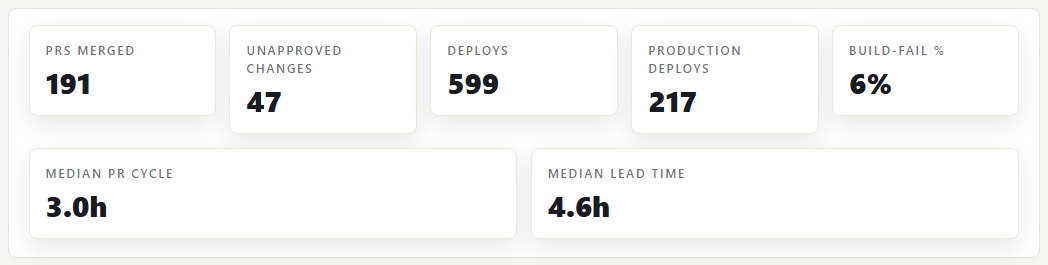
Headline numbers for the quarter: pull requests merged, unapproved changes, deploys and production deploys, build-fail rate, and median pull request cycle time and lead time, all from Azure DevOps service hooks. The unapproved count is the number an auditor asks about first.

The quarter at a glance

Changes that skipped review

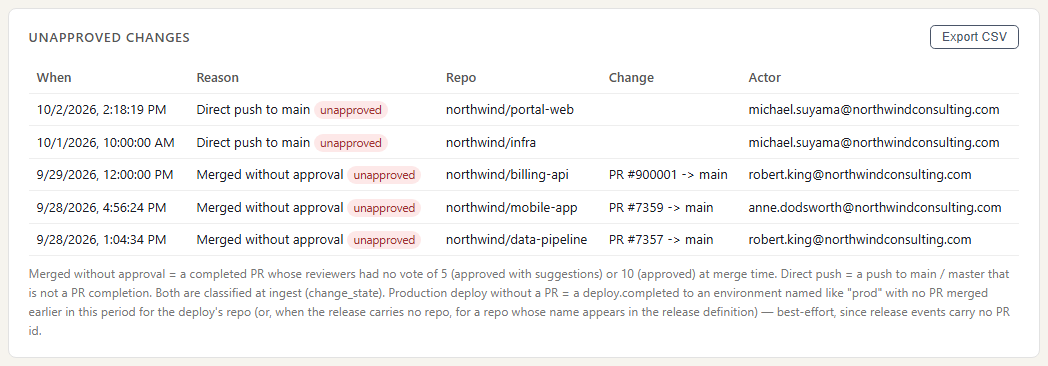
Every pull request merged with no approving vote, and every direct push to main or master, with the person, repository and time. In the showcase week there are two: a merge with no approving review on Tuesday and a direct push to main on Thursday.

Changes that skipped review

Changes by day

Pull requests, pushes, builds and deploys per day across all repositories, with unapproved changes and direct pushes as their own series so they stand out against routine work.

Changes by day

Where the data comes from

Change control is built from what Azure DevOps reports as it happens: pull requests, reviews, pushes, builds and releases. Approval is read from the reviewers' votes, not from anyone's say-so.

Azure Repos

What we collect

Pull requests opened, updated, completed and abandoned, with reviewers and their votes, and pushes with the branch they went to.

How it connects

Service hooks in your Azure DevOps project send each change to a web address you create in ActivityLog. It arrives within seconds.

Azure Pipelines and releases

What we collect

Build results per pipeline and branch, and release deployments per environment, started and finished, succeeded or failed.

How it connects

The same service hooks and web address.

How it works

  1. Azure DevOps reports each change

    Every pull request, push, build and deployment is sent to ActivityLog within seconds, with who did it and where it was going.

  2. Read the approval and the person

    When a pull request completes, we check its reviewer votes. Approved, or approved with suggestions, counts as approved; no approving vote counts as unapproved. A push straight to main or master is flagged as a direct push, unless it is the merge Azure DevOps makes when it completes a reviewed pull request. Each change is tied to the engineer who made it.

  3. Follow it to production

    Changes are followed from pull request opened, to merged, to the first successful production deploy, so lead time and approval rate per repository come from the same data.

  4. Hand it to the auditor

    The changes list exports to CSV: every production change, its approval and the exceptions, for the period you choose.

Questions

What counts as approved?

A pull request counts as approved when at least one reviewer voted Approved or Approved with suggestions, the same votes Azure DevOps branch policies accept. Votes are read from Azure DevOps at the moment the pull request completes.

Can it misread a change?

In one known case. If someone completes a pull request with a custom merge message, for example an edited squash-merge message, the push to main looks like a direct push and is flagged. Those are easy to check in the changes list.

Do you need access to our code?

No. Service hooks send the change details: who, which repository and branch, reviewers and results. We do not store pull request comments or code diffs, and we never copy your repositories.

Built from

  • Azure DevOps repos
  • Azure Pipelines
  • Azure DevOps releases

See it with your own sources.

ActivityLog is in beta. Connect the tools you already use and get this report for your organisation.

See pricing →

Questions first? Talk to us → · All use cases