ActivityLog Contact us
Use cases · Knowledge and documentation Delivery and change

Know which knowledge is used, and which is going stale

ActivityLog follows how your team uses its knowledge base: what gets read, what gets edited, who keeps it current, and how tickets move. Stale pages that people still depend on stand out.

For you

See your docs earn their keep

Which of your pages people open, which tickets you moved, and what you wrote this sprint.

Pages I edited most

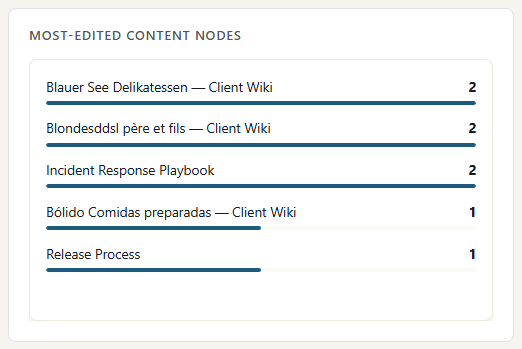
The Knowledge Base report filtered to Anne Dodsworth: the pages she edited this week, with the number of edits on each. Put it next to the team's most-read list to see whether her effort is going into the pages people rely on.

Pages I edited most

Tickets I moved

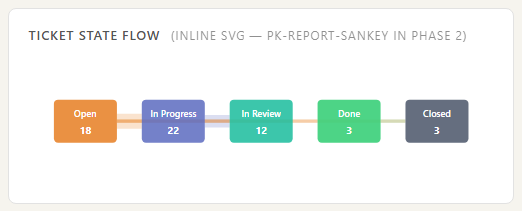
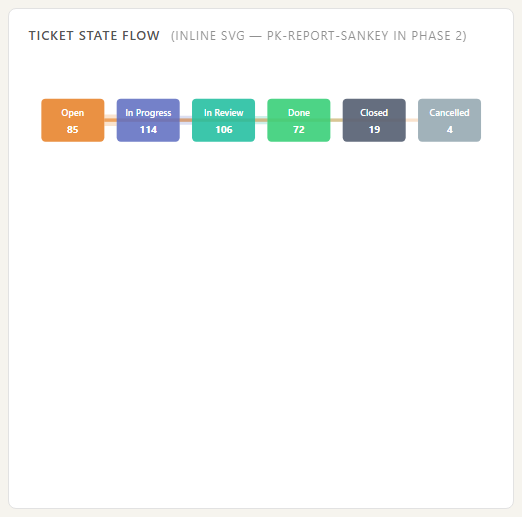
Anne's ticket activity for the sprint as a flow between states: the tickets she opened and moved, from the knowledge base's own ticket history.

Tickets I moved
For your organisation

Keep the knowledge people rely on current

The most-read pages, the authors behind them, ticket flow through the sprint, and the heavily used pages nobody has touched in months.

Most-read pages, with last edit

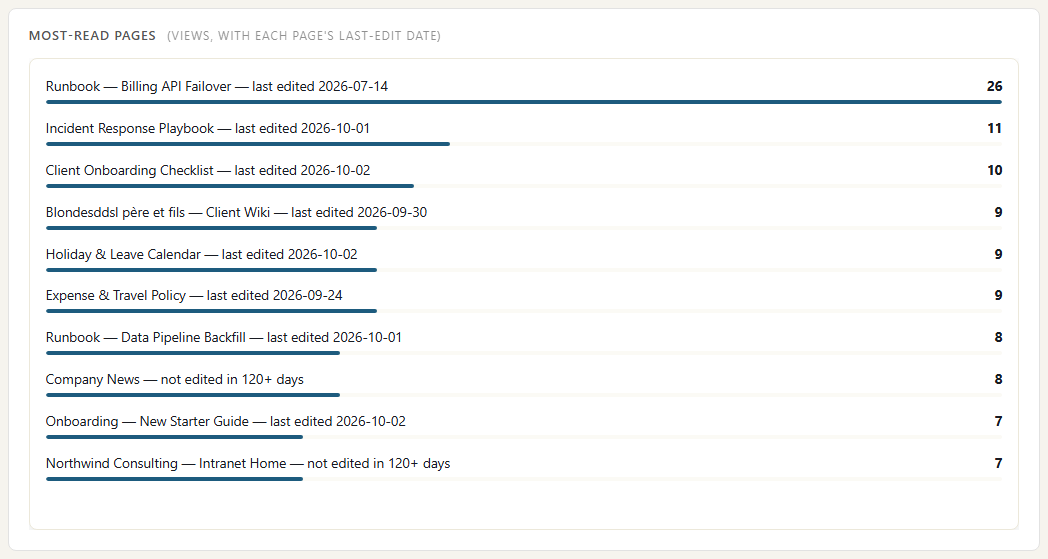
The pages people opened most this week, with the date each was last edited, from knowledge-base page views and edits. The top row is a runbook many people rely on that nobody has updated in over 60 days: the one to fix first.

Most-read pages, with last edit

Most-edited pages

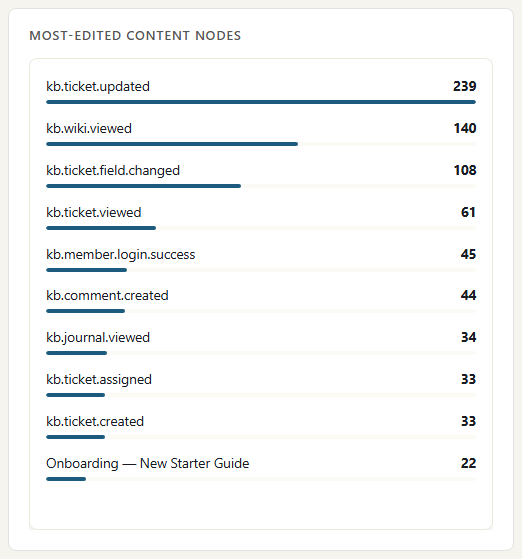
The pages edited most this week, with the number of edits. Heavy editing on one page, here the onboarding page, usually means it is being rewritten. Read it next to the most-read list to see whether effort goes where readers are.

Most-edited pages

Ticket flow through the sprint

How tickets moved between states over the sprint, built from each ticket's status changes. A wide band stuck in one state is where work is waiting.

Ticket flow through the sprint

Where the data comes from

Knowledge use is read from your knowledge base's own activity: who wrote, who edited, who read and how tickets moved. SharePoint documents add the files that live outside it.

Knowledge base (Umbraco)

What we collect

Pages and wiki entries created, edited and published, page views, tickets opened, moved and closed, comments and sprints, with the page title and author.

How it connects

An ActivityLog package installed in your Umbraco site sends each change as it happens.

SharePoint and OneDrive

What we collect

Documents viewed and edited, with the file name and site. Never the file content.

How it connects

The read-only Microsoft 365 connection, approved once by your Microsoft 365 admin. It reads Microsoft's own audit trail.

How it works

  1. Collect reads, edits and tickets

    Every page edit, page view, ticket move and comment is reported with who did it and when.

  2. Tie it to people and products

    Authors and readers are matched to people by email. Pages and tickets keep the client or product they belong to in the knowledge base.

  3. Report

    The most-read pages with their last edit date, the most-edited pages, top authors, ticket flow through the sprint and release tickets.

  4. Act

    Authors see their pages being used. Leads spot the pages everyone reads and nobody maintains, and ask the owner to update them.

Questions

What counts as stale?

A page people keep reading but nobody has edited in a long time: over 60 days in our example. The most-read list shows each page's last edit date, so the gap is easy to see. Old is not always wrong; it is a prompt for the owner to check.

Do you copy our documentation?

No. We record that a page was edited or read, by whom and when, with its title. The page content stays in your knowledge base.

Do we have to use Umbraco?

The ready-made connection is for Umbraco. Another knowledge base or wiki can send its activity to the ActivityLog ingest API, with some setup on your side.

Built from

  • Knowledge base (Umbraco)
  • SharePoint

See it with your own sources.

ActivityLog is in beta. Connect the tools you already use and get this report for your organisation.

See pricing →

Questions first? Talk to us → · All use cases