

ActivityLog Contact us
Use cases · Training and enablement Security and compliance

Training that tracks itself

ActivityLog follows enrolments, completions and phishing tests from your learning tools, so you see who is done, who is overdue and who needs help.

For you

Know what is due

Your courses, deadlines and results in one place.

My courses and deadlines

Anne Dodsworth's required courses with due date, status and quiz result, straight from Moodle. Her security awareness course was due on 30 September and is still in progress.

My courses and deadlines
For your organisation

Compliance training without spreadsheets

Completion by course and person, overdue training, quiz results and phishing outcomes, ready for an audit.

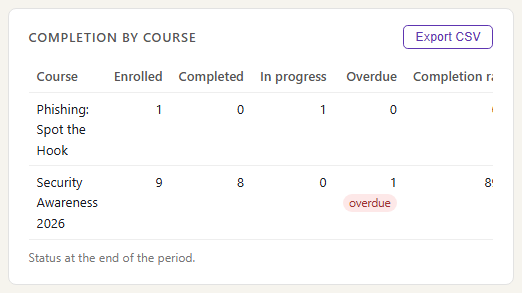
Completion by course

For each course: how many people are enrolled, in progress and complete, from Moodle's completion records. A course with people still in progress near its due date is where reminders are needed.

Completion by course

Who is overdue

Everyone with a required course past its due date, with how late it is. This week there is one: Anne's security awareness course.

Who is overdue

Phishing test results

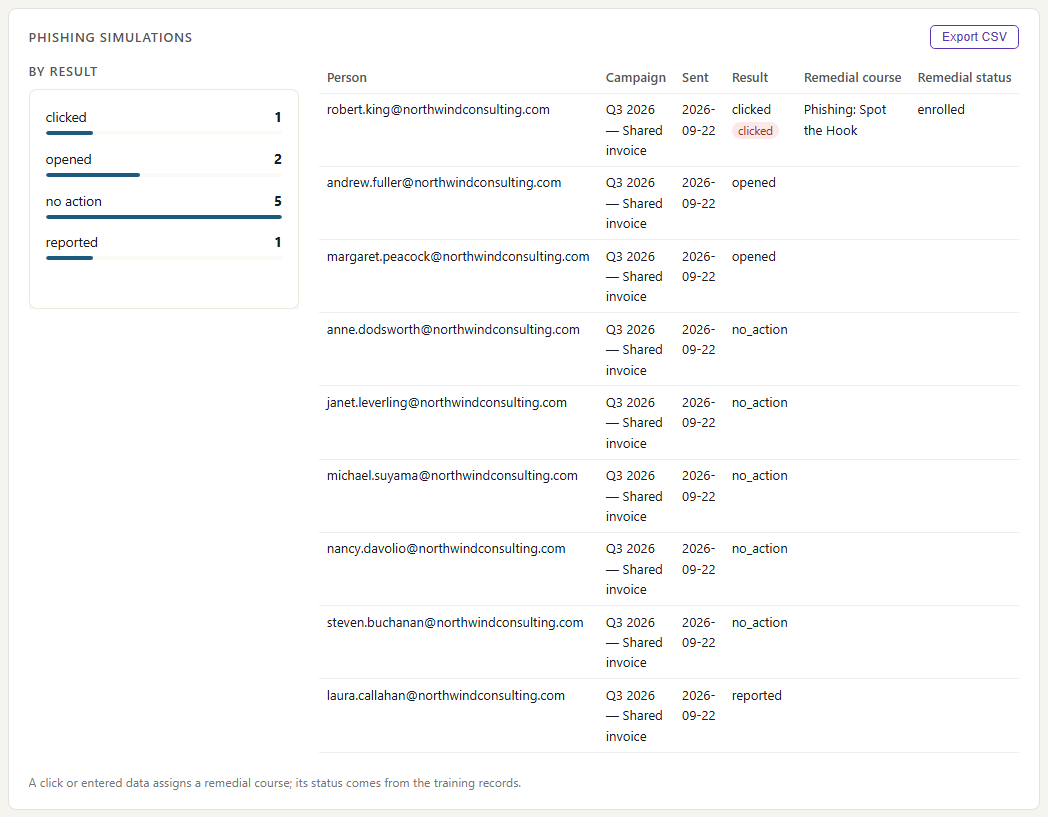
The latest phishing simulation, person by person, from KnowBe4: who reported it, who ignored it and who clicked. Laura reported it; Robert clicked and was assigned remedial training, not yet overdue.

Phishing test results

Where the data comes from

Training records come from your learning platform and your phishing-test tool. Enrolments, due dates, completions and results are read from them directly, so nobody keeps a spreadsheet.

Moodle

What we collect

Enrolments, course and module views, quiz attempts with score and pass or fail, course completions, due dates and time spent in a course.

How it connects

Read from Moodle on a schedule, through its web services or its activity history. Self-hosted Moodle works.

KnowBe4

What we collect

Phishing simulation results per person (no action, opened, clicked, reported, entered data) and any remedial training assigned.

How it connects

Read from KnowBe4's reporting API with a read-only key.

How it works

  1. Collect enrolments, completions and results

    Moodle reports who enrolled, what they viewed, quiz results and completions. KnowBe4 reports how each person handled a phishing test.

  2. Tie it to people

    Each activity is tied to a person by their work email. A second address, such as a login at a partner company, can be added as an alias so it lands on the same person. Each record keeps the time it happened in Moodle or KnowBe4, not the time it reached us.

  3. Report

    Completion by course and person, who is overdue, quiz results, and phishing outcomes.

  4. Act

    People finish what is due. Leads chase the overdue, follow up on phishing clicks, and hand completion records to an auditor.

Questions

Do you see quiz answers?

No. We keep the score and whether it passed, not the answers given.

Why does someone show as overdue when they say they finished?

Completion is read from Moodle. If the course was done outside Moodle, or Moodle's completion rule was not met (for example a quiz not passed), it stays incomplete here too.

Does it work with other learning platforms?

Moodle is the platform this page is built around. Another platform can send enrolments and completions to the ActivityLog ingest API, with some setup on your side.

Built from

  • Moodle
  • KnowBe4

See it with your own sources.

ActivityLog is in beta. Connect the tools you already use and get this report for your organisation.

See pricing →

Questions first? Talk to us → · All use cases