ActivityLog Contact us
Use cases · Productivity People and time

See where the team's time actually goes

ActivityLog shows how a team's week splits between meetings, mail, documents and delivery work, from the tools they already use. Spot overload early, without timesheets or surveys.

For you

Protect your focus time

See how much of your week went to meetings and mail, and which days had no room for real work.

My week: meetings against everything else

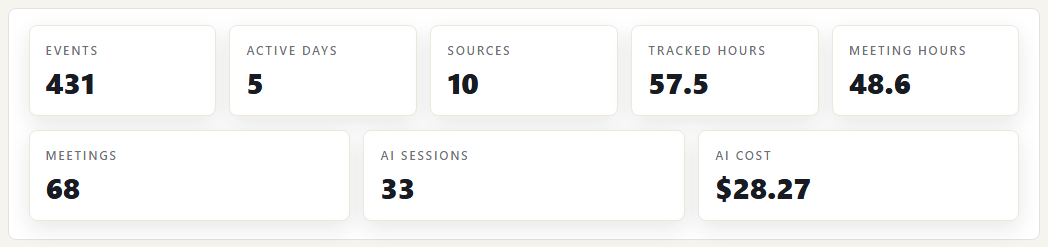
Michael Suyama's headline numbers from My week, with meeting hours set against tracked hours. Meeting hours come from Teams attendance; tracked hours add his document and delivery work. When the two numbers are close, there was little time left for focused work.

My week: meetings against everything else

My days, by source

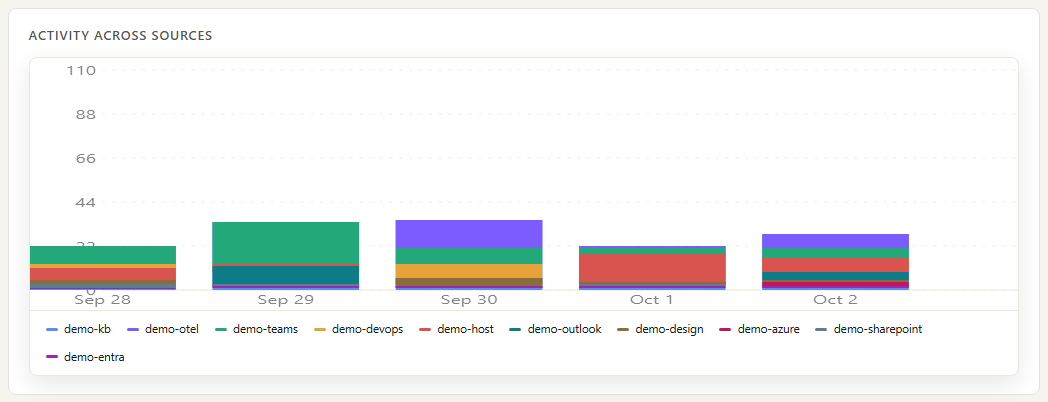
Michael's activity per day, stacked by source. Thursday is almost all Teams and Outlook, with no Azure DevOps work: a day with no focus time.

My days, by source
For your organisation

See where the team's focus goes

The team's activity by client, compared month by month, shows where focus is shifting before anyone reports it. Meetings, calls, mail and file work by day show when meetings are eating the week. Built for planning, not for ranking people.

Focus by client

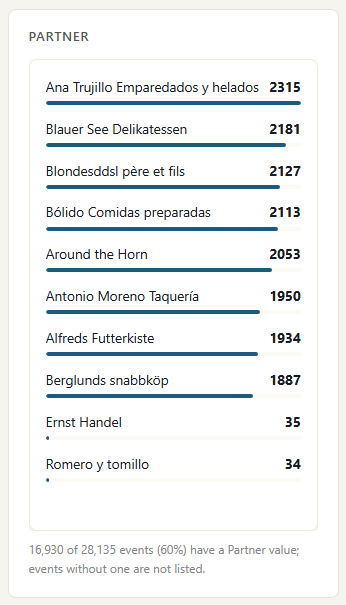
The team's activity for the month broken down by client, from Microsoft 365, the knowledge base and Azure DevOps. Run it for this month and last to see which clients are taking more of the team's attention and which are getting less. Activity with no client shows as unassigned.

Focus by client

The team's week in Microsoft 365

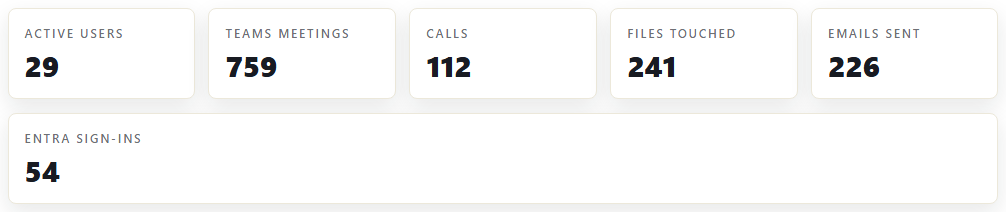
Headline numbers across the team: active users, Teams meetings, calls, files touched, emails sent and Entra sign-ins, each from the matching Microsoft 365 service. Compare weeks rather than reading one number on its own.

The team's week in Microsoft 365

Activity by day and service

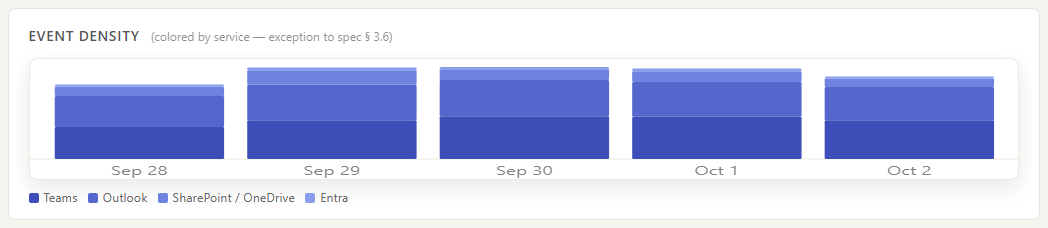
Team activity per day, coloured by service: Teams, Outlook, SharePoint, OneDrive and Entra. A day dominated by Teams is a meeting day; a day dominated by SharePoint is document work.

Activity by day and service

Where the data comes from

The picture of a team's week is built from Microsoft 365 and your delivery tools. It counts meetings, calls, mail, files and delivery work. It does not watch screens or count keystrokes.

Microsoft Teams

What we collect

Meetings and calls with the time each person was actually in them. Not chat or meeting content.

How it connects

The read-only Microsoft 365 connection, approved once by your Microsoft 365 admin. It reads Microsoft's own audit trail. Call times come from Teams call records.

Outlook

What we collect

Mail sent and calendar changes, with times. Never the message body.

How it connects

The same Microsoft 365 connection.

SharePoint and OneDrive

What we collect

Files opened, edited, uploaded and shared. File names, never the content.

How it connects

The same Microsoft 365 connection.

Entra ID

What we collect

Sign-ins, succeeded and failed.

How it connects

The same Microsoft 365 connection.

Azure DevOps

What we collect

Pull requests, pushes, builds and releases: the delivery side of the week.

How it connects

Service hooks in your Azure DevOps project send each change to a web address you create in ActivityLog. It arrives within seconds.

How it works

  1. Collect what the tools already record

    Microsoft 365 and Azure DevOps report meetings, calls, mail, files and delivery work. Nothing is installed on anyone's computer.

  2. Tie it to people

    Each activity is tied to a person by their work email. A second address, such as a login at a partner company, can be added as an alias so it lands on the same person.

  3. Measure the mix

    Meeting and call hours come from real attendance. Mail, file and delivery activity are counted per person and per day, by service, so you can see how a week split up.

  4. Rebalance

    People protect their focus time; managers spot overload early and move work. It is built for planning, not for ranking people.

Questions

Is this employee monitoring?

No screen capture, no keystrokes, no app tracking and no message content. It shows the activity Microsoft 365 and your delivery tools already record about meetings, mail and files. We built it to spot overload and plan work, and we recommend you do not use it to rank people.

Why does someone look quiet?

Work in tools you have not connected does not show, and neither does time spent thinking, on paper or on calls outside Teams. Low activity is a reason to ask, not a conclusion.

How current is it?

Microsoft 365 activity arrives 30 to 90 minutes after it happens, because that is when Microsoft publishes it. Azure DevOps arrives within seconds.

Built from

  • Microsoft Teams
  • Outlook
  • SharePoint and OneDrive
  • Entra ID
  • Azure DevOps

See it with your own sources.

ActivityLog is in beta. Connect the tools you already use and get this report for your organisation.

See pricing →

Questions first? Talk to us → · All use cases