ActivityLog Contact us
Use cases · Design and creative work Delivery and change

Design work, per client and per deliverable

ActivityLog follows design reviews and versions from Figma and creative-seat changes from Adobe, tied to clients and to the delivery that followed.

For you

Your review cycle, end to end

Comments, approved versions and the hand-off to the client in order.

My review cycle, end to end

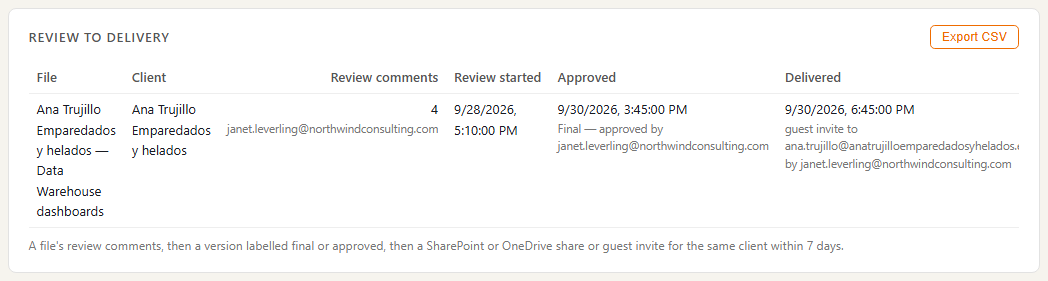
Janet's part of the review on the Ana Trujillo data warehouse designs: her Figma comments, the version labelled 'Final - approved' on Wednesday at 08:45, then her invite of the client's guest to their SharePoint site at 11:30. Figma supplies the review; SharePoint supplies the hand-off. Comments from others on the same file show on the team view.

My review cycle, end to end

My files this week

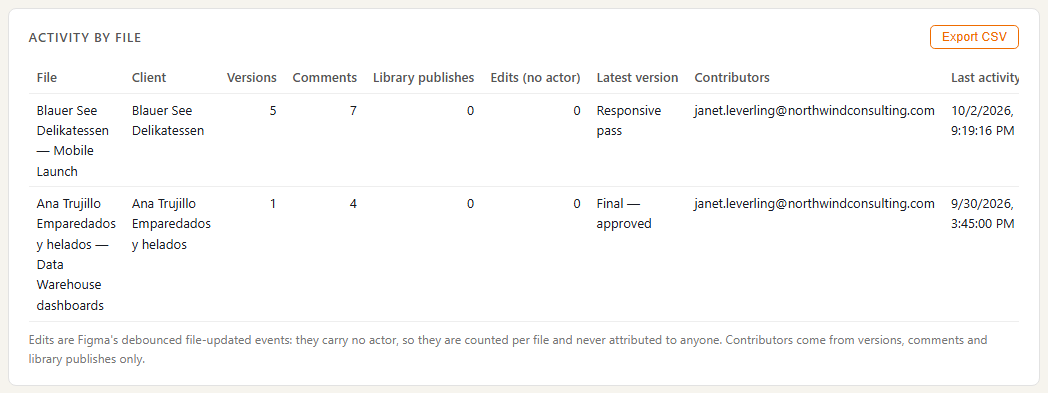
Janet Leverling's Figma files with the versions she saved and comments she made. Edits Figma sends without a person are counted for the file, not for her.

My files this week
For your organisation

Creative effort you can see

Design activity by client and deliverable, and which creative seats are not being used.

Design activity by client

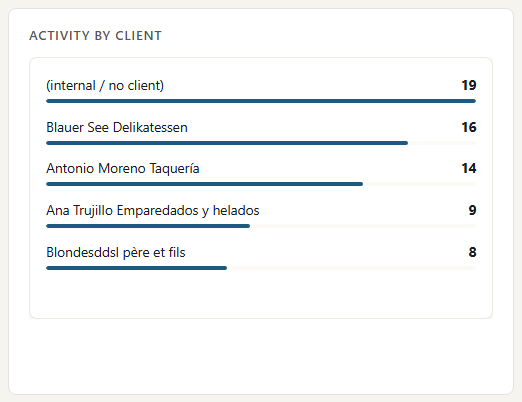
Versions, comments and library publishes per client deliverable this week, from Figma. Only activity Figma attributes to a person is credited to them; unattributed edits count for the file only.

Design activity by client

Creative Cloud seats

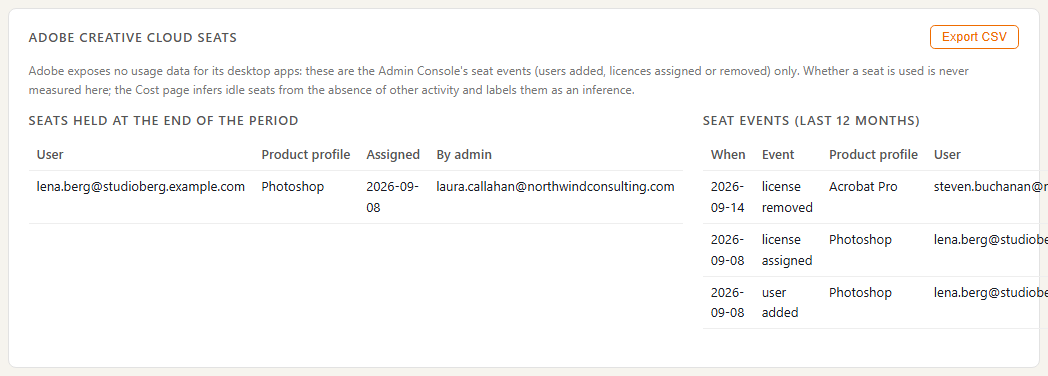
Adobe Creative Cloud seats by person, with seat changes over the quarter. Andrew's seat shows no design work or Adobe sign-in for over 60 days. Adobe gives no usage data, so this is marked as an inference, not a last-used date. Figma activity per designer is shown separately.

Creative Cloud seats

Where the data comes from

Design activity comes from Figma's notifications about versions, comments and library updates, and from Adobe's admin history of who holds a seat. Client hand-offs come from SharePoint sharing.

Figma

What we collect

Named versions saved, comments, library publishes and file deletions, with the file name and the designer.

How it connects

Figma sends these to a web address you create in ActivityLog. On the Professional plan Figma names people by their Figma handle, which we match to your staff with a short list.

Adobe Creative Cloud

What we collect

Admin changes: users added or removed and licences assigned or removed, with who made the change.

How it connects

From the Adobe Admin Console's admin history.

SharePoint and OneDrive

What we collect

Files shared with clients and guests invited to client sites, with time and person. Never the file content.

How it connects

The read-only Microsoft 365 connection, approved once by your Microsoft 365 admin. It reads Microsoft's own audit trail.

How it works

  1. Collect versions, comments and seats

    Figma reports versions, comments and library publishes. Adobe reports seat changes. SharePoint reports the hand-off to the client.

  2. Tie it to designers and clients

    Figma handles are matched to people from a short list you keep. Files are tied to a client by a rule on the file or project name, for example 'Ana Trujillo - Data warehouse'.

  3. Report

    Design activity by client and deliverable, each review cycle from first comment to client delivery, and creative seats with their last design activity.

  4. Act

    Designers show their review cycle end to end. The delivery lead sees effort per client and reclaims seats nobody uses.

Questions

Can you track time spent designing?

Not precisely. Figma does not say who made everyday edits, only who saved versions and left comments. Design effort is shown from those moments, so treat it as effort you can see, not hours worked.

Do you see our designs?

No. We record file names, version labels and that a comment was made, with who and when. We do not download files, images or comment text.

How is a file tied to a client?

By a rule you set on the file or project name, so a file named 'Ana Trujillo - Data warehouse' lands on the Ana Trujillo client.

Built from

  • Figma
  • Adobe Creative Cloud
  • SharePoint

See it with your own sources.

ActivityLog is in beta. Connect the tools you already use and get this report for your organisation.

See pricing →

Questions first? Talk to us → · All use cases