ActivityLog Contact us
Use cases · Website and marketing analytics Revenue and growth

From campaign to customer, in one view

ActivityLog lines up website traffic, the content changes behind it and the leads it produced, through to the deals they became.

For you

See what your content did

Publish a page and watch the visits, the campaign that drove them and the leads that followed.

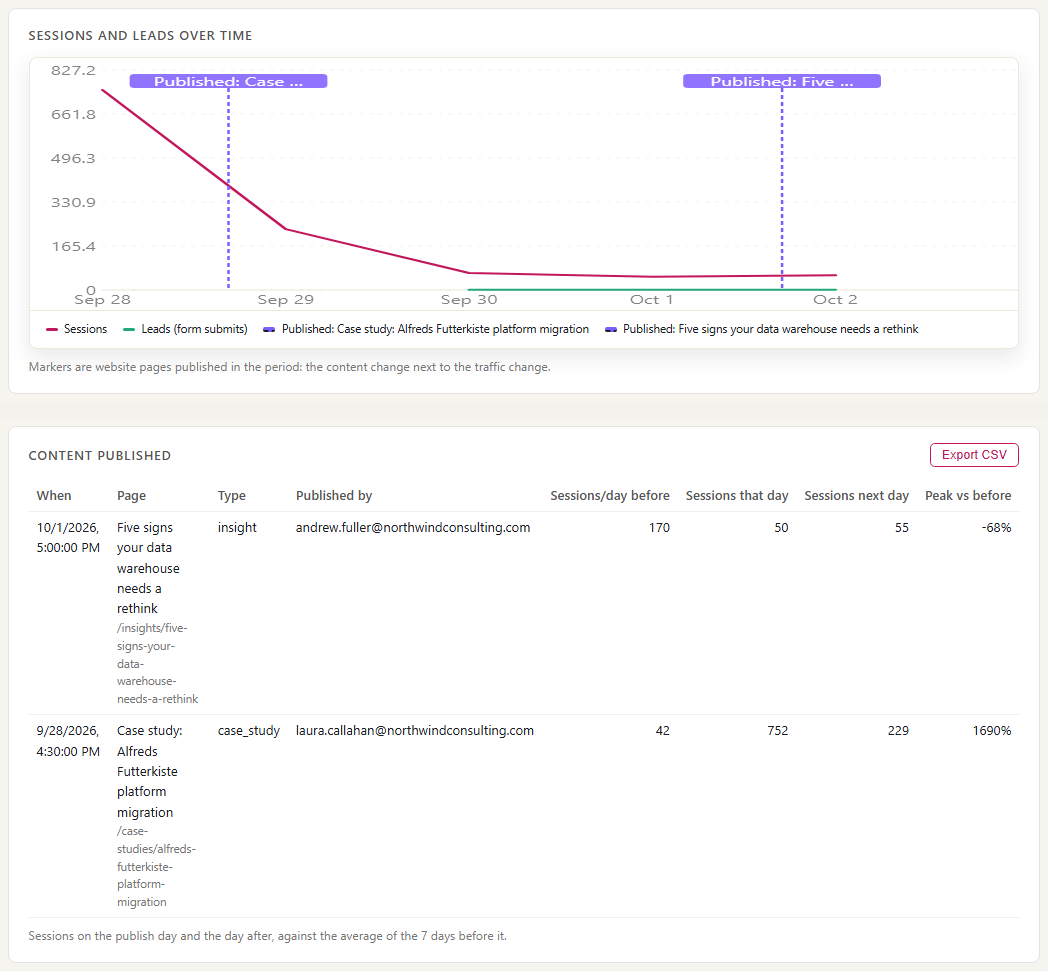
What a page did after it went live

Laura Callahan's case study in the list of content published from the CMS on Monday, with the site's sessions before and after it, and the sessions chart with the publish marked. Visits come from Google Analytics and are anonymous, so this is the whole site's traffic, not one author's; it does not split out campaigns or form submits for a single page.

What a page did after it went live
For your organisation

Marketing tied to revenue

Sessions by campaign and landing page, conversions, and the path from an anonymous visit to a named lead and a deal.

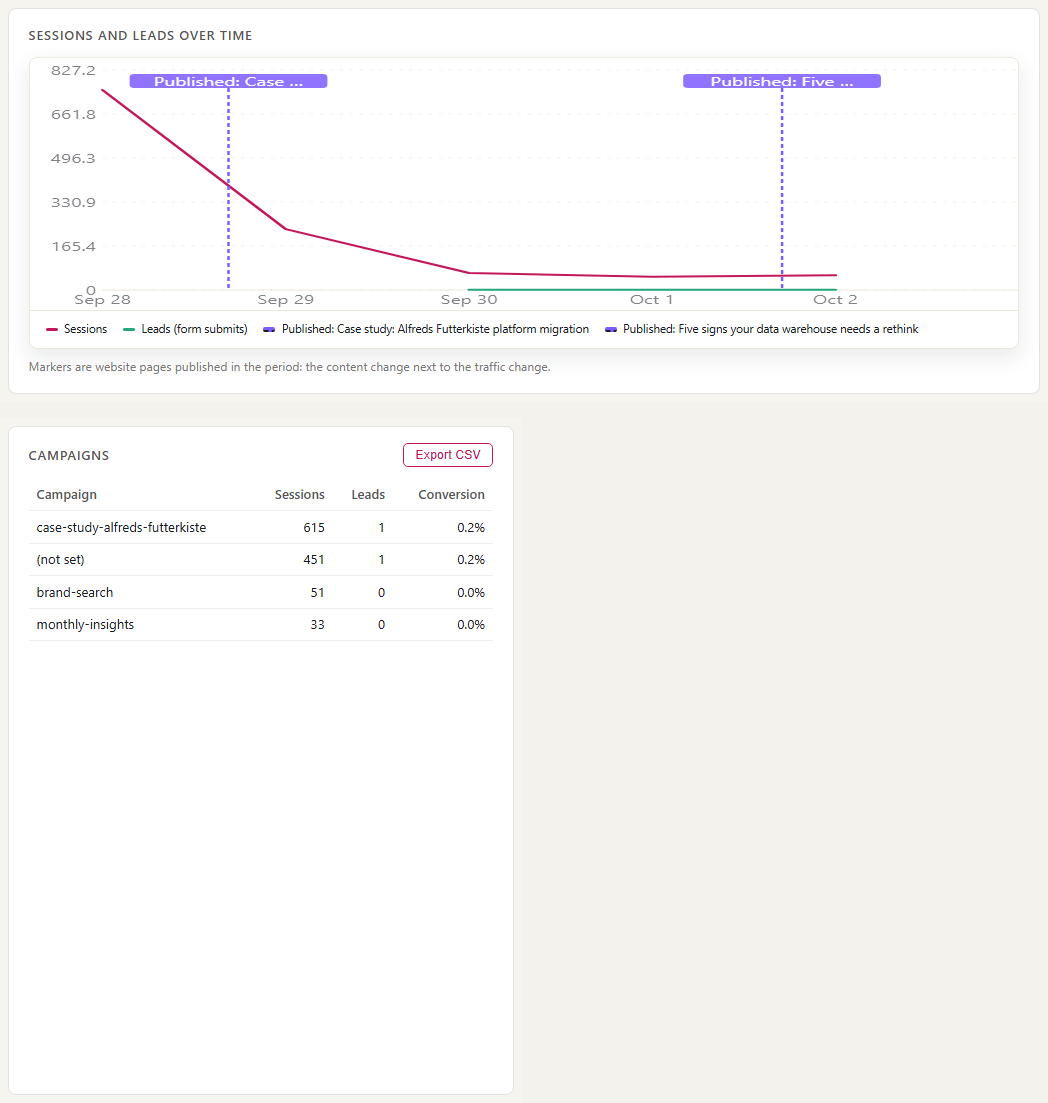
Traffic with the cause marked

Sessions and leads per day for the whole site, with website publishes marked on the timeline, and the campaigns table with the sessions each campaign brought. Monday's case-study publish lines up with the spike; the table shows which campaigns drove the traffic.

Traffic with the cause marked

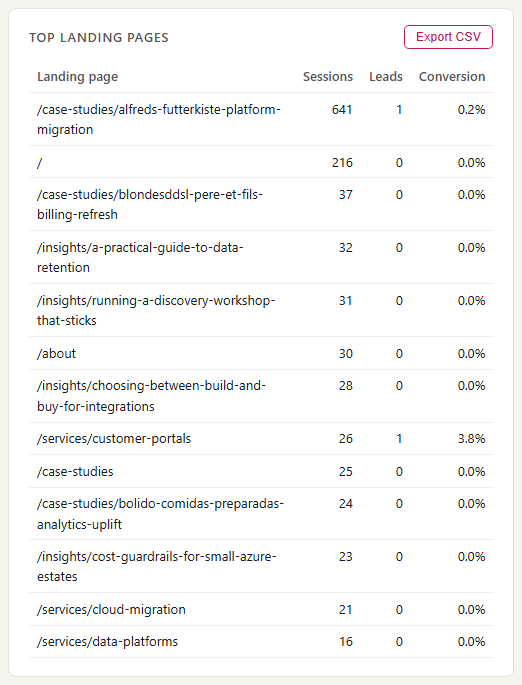
Landing pages and conversions

The pages visitors arrived on, with sessions and form submits for each. A page with many sessions and no submits is getting attention but not leads.

Landing pages and conversions

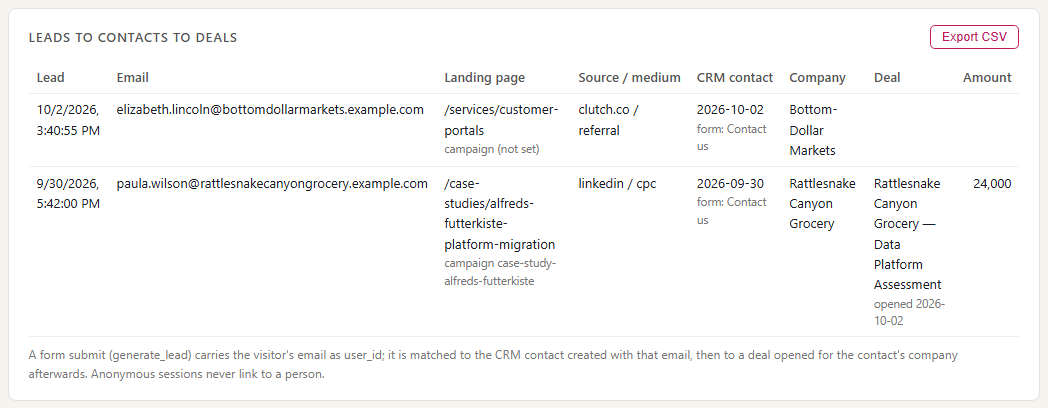
Campaign to deal

The path from a campaign to sessions, to a form submit that created a HubSpot contact, to a deal. Here a Wednesday form submit became a named lead and a deal opened on Friday. Everything before the form submit is anonymous.

Campaign to deal

Where the data comes from

Website numbers come from Google Analytics, page changes from your website's CMS, and leads and deals from HubSpot. Lined up in time, they show which content and campaign led to which lead.

Google Analytics 4

What we collect

Sessions, page views, scrolls and form submits, with campaign, source, medium, landing page, device type and country.

How it connects

Through Google Analytics' BigQuery export, which gives each visit as it happened rather than a daily summary.

Website CMS (Umbraco)

What we collect

Pages published and updated, with who published them and when.

How it connects

The ActivityLog package for Umbraco reports publishes as they happen. Other CMSs can send publishes to the ActivityLog ingest API.

HubSpot

What we collect

Contacts created from form submissions, with the form and page, and the deals they turn into.

How it connects

The same HubSpot connection used for sales: record changes sent to a web address you create in ActivityLog.

How it works

  1. Collect traffic, publishes and leads

    Google Analytics reports visits, your CMS reports publishes, and HubSpot reports new contacts and deals.

  2. From anonymous visit to named lead

    A visit stays anonymous until the visitor submits a form. At that point the form's email links the visit to the new HubSpot contact. Publishes are tied to the staff member who published.

  3. Report

    Sessions by campaign and landing page, publishes marked on the timeline, form submits, and the path from campaign to lead to deal.

  4. Act

    Writers see what their content did. Marketing puts budget behind the campaigns and pages that produce leads, not just visits.

Questions

Do you identify anonymous visitors?

No. Visitors stay anonymous unless they submit a form and give their email. We do not buy data or match IP addresses to companies.

Does this replace Google Analytics?

No. Keep using Google Analytics for detailed web analysis. This page joins its numbers to publishes, leads and deals, which Google Analytics cannot see.

What does setup involve?

Turn on the BigQuery export in Google Analytics, connect HubSpot and connect your CMS. With the free daily export, today's traffic shows up tomorrow.

Built from

  • Google Analytics 4
  • website CMS
  • HubSpot

See it with your own sources.

ActivityLog is in beta. Connect the tools you already use and get this report for your organisation.

See pricing →

Questions first? Talk to us → · All use cases