ActivityLog Contact us
Use cases · Cloud and SaaS cost control Cost and operations

See what changed when your bill did

ActivityLog puts daily cloud cost next to the deployments and resource changes that caused it, and shows which software seats are paid for but unused.

For you

Know the cost of your change

See how a release or a resource you created moved the bill the next day.

The cost of a change

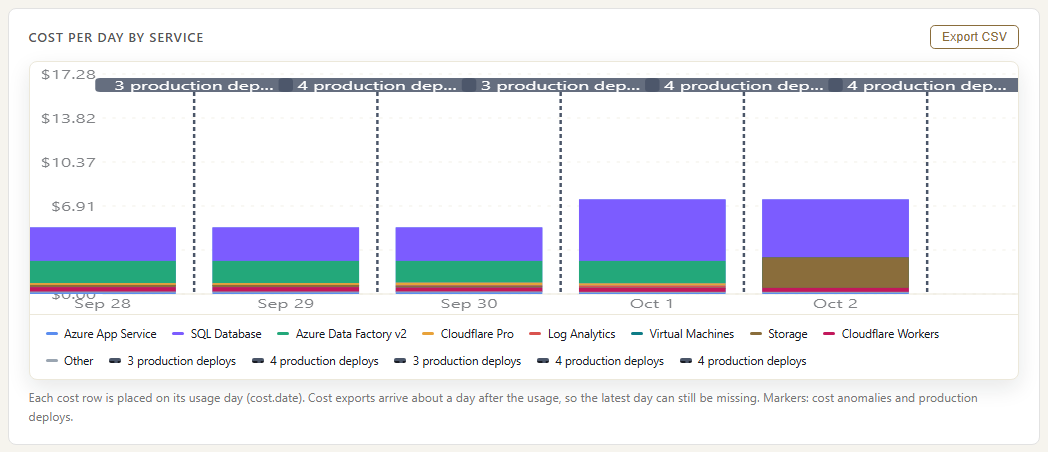
Cost per day by service, with production deploys marked. Robert King's Wednesday release scaled up the App Service plan, and from Thursday, the first full day at the larger size, the App Service line is higher. Cost is not tied to a person and this view covers the whole bill, not one resource group. Cost comes from the Azure export; the release from Azure DevOps.

The cost of a change
For your organisation

Spend you can explain

Cloud cost by service and client, anomalies with the change behind them, and licences assigned versus actually used.

Spend by service and client

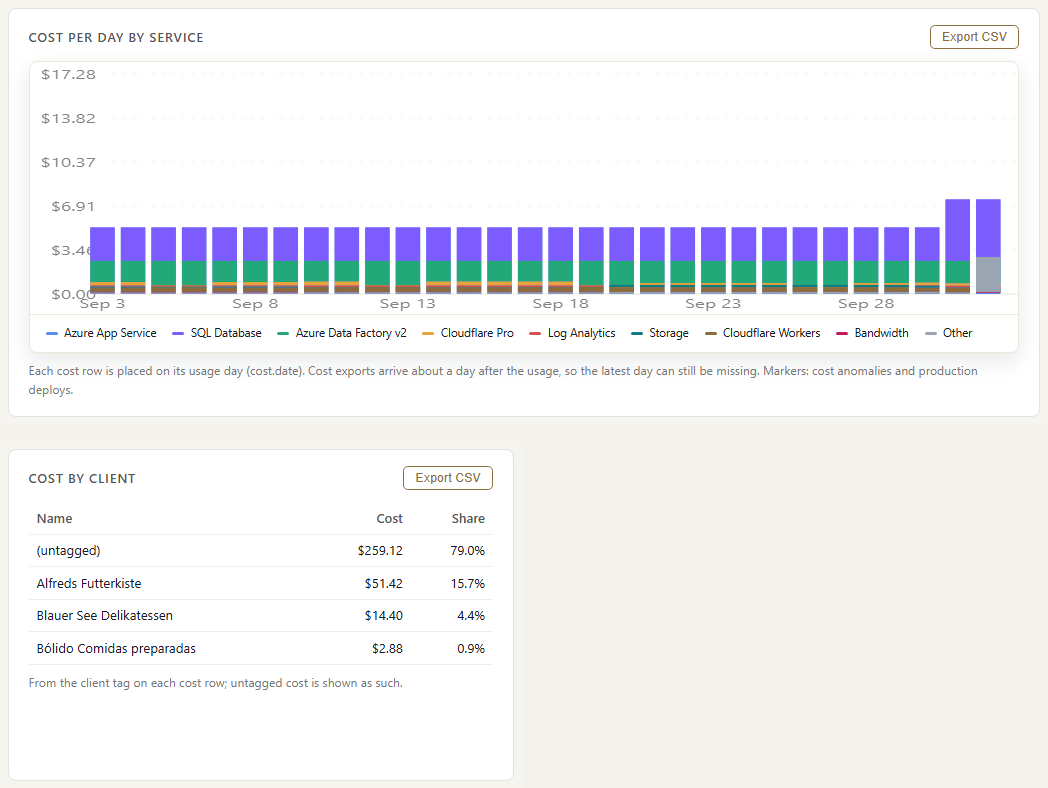
Daily cloud cost by service, and cost by client from your resource tags, from the Azure cost export and Cloudflare usage. Cost with no client tag is shown as untagged and cannot be split, so tagging is the first thing to fix.

Spend by service and client

Anomalies and the change behind them

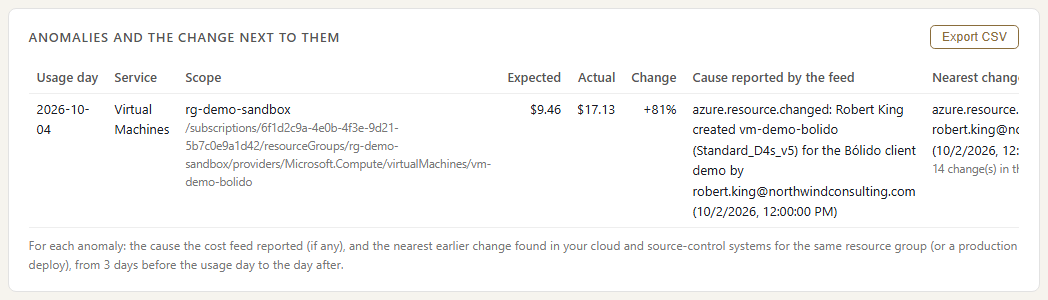
Cost anomalies with the resource change that explains each one. A demo VM started on Friday ran all weekend, and Monday's anomaly points straight to the change that created it.

Anomalies and the change behind them

Seats paid for versus used

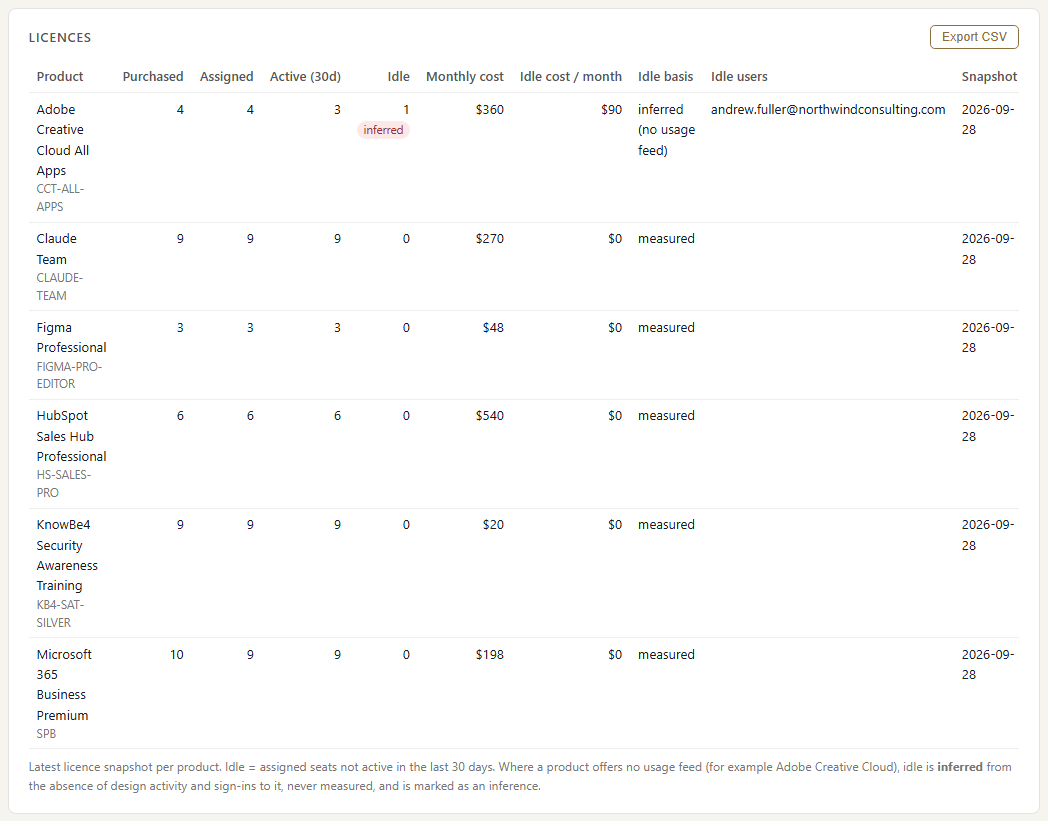
For each product: seats bought, seats assigned and seats with activity in the last 30 days, with the monthly cost of the gap. Andrew's Adobe Creative Cloud seat is flagged as likely idle; because Adobe reports no usage, that row is marked as an inference.

Seats paid for versus used

Where the data comes from

Cost data comes from your cloud bills and your software licence counts. Each cost is placed on the day the resources were used, next to the deployments and changes from the same days, so a jump in the bill has its likely cause beside it.

Azure Cost Management

What we collect

Daily cost per service, resource group and resource, with your tags (for example client or environment), and Azure's cost anomaly alerts.

How it connects

A scheduled cost export from Azure Cost Management, read each day.

Cloudflare

What we collect

Daily requests, bandwidth and Workers usage, and the account's audit trail of who changed what.

How it connects

Read from Cloudflare's analytics and audit APIs with a read-only API token.

Software licences (Microsoft 365, Adobe, Figma, HubSpot, Claude)

What we collect

Seats bought, seats assigned, and seats with activity in the last 30 days, with the price per seat.

How it connects

Microsoft 365 seat counts and last activity per service come from Microsoft's licence and usage reports; other products from their admin data. Prices are not in any of these feeds; you give us the per-seat price from your contract.

Azure activity and Azure DevOps

What we collect

Resource changes and deployments, used to explain why a cost moved.

How it connects

The same connections that feed the SIEM and Change control pages. No extra setup.

How it works

  1. Collect cost and seats every day

    Daily cost rows from Azure and Cloudflare, and a weekly count of seats bought, assigned and used for each software product.

  2. Tie cost to clients, changes and people

    Resource tags put cost against a client. The resource behind a cost is matched to the deployment or change that touched it, and to the person who made it. Seats are matched to the people who hold them.

  3. Report

    Cost by service and client, anomalies with the change behind them, and licences bought against licences actually used.

  4. Act

    Engineers see what their change cost. Owners shut down idle resources, reclaim unused seats and explain the bill.

Questions

Why is today's cost missing?

Azure publishes cost about a day late, and up to 48 hours late on pay-as-you-go. We show each cost on the day it was incurred, so the most recent day fills in once Azure reports it.

How do you know a seat is unused?

For Microsoft 365, Figma, HubSpot and Claude we use each product's own activity. Adobe reports no usage, so an Adobe seat is only inferred idle, from no design activity and no Adobe sign-in, and the report says so.

Does it match our invoice?

Azure figures come from Azure's own cost export, so they follow your Azure invoice. Licence costs use the per-seat price from your contract, so they are only as current as that price.

Built from

  • Azure Cost Management
  • Cloudflare
  • Microsoft 365 licences
  • Adobe
  • Figma
  • HubSpot
  • Claude

See it with your own sources.

ActivityLog is in beta. Connect the tools you already use and get this report for your organisation.

See pricing →

Questions first? Talk to us → · All use cases