ActivityLog Contact us
Use cases · Security events Security and compliance

Security events with the context to act on them

ActivityLog puts endpoint alerts, device compliance, risky sign-ins and server alerts on one timeline, next to the changes and people behind them.

For you

Know when it was you

See security events on your own devices and accounts with the change or sign-in that caused them, so expected activity is closed quickly.

Alerts on my devices and accounts

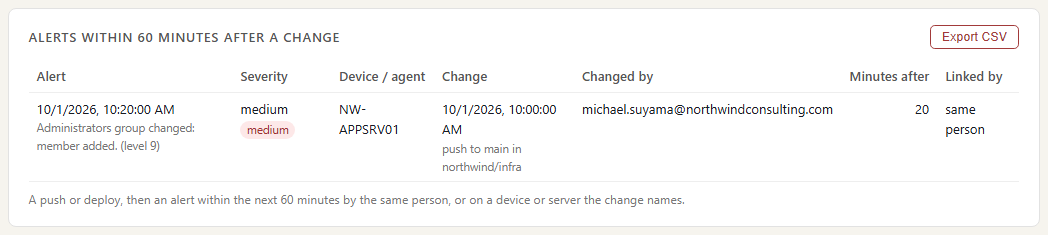
Michael Suyama's alerts for the week with the nearest change next to each. Thursday's new local administrator on the app server, from Wazuh, sits 20 minutes after his push to main from Azure DevOps, so he can close it as expected.

Alerts on my devices and accounts
For your organisation

Four consoles, one timeline

Defender, Intune, Entra and server alerts together, tied to people, devices and recent changes, so real issues stand out from routine noise.

Four consoles, one timeline

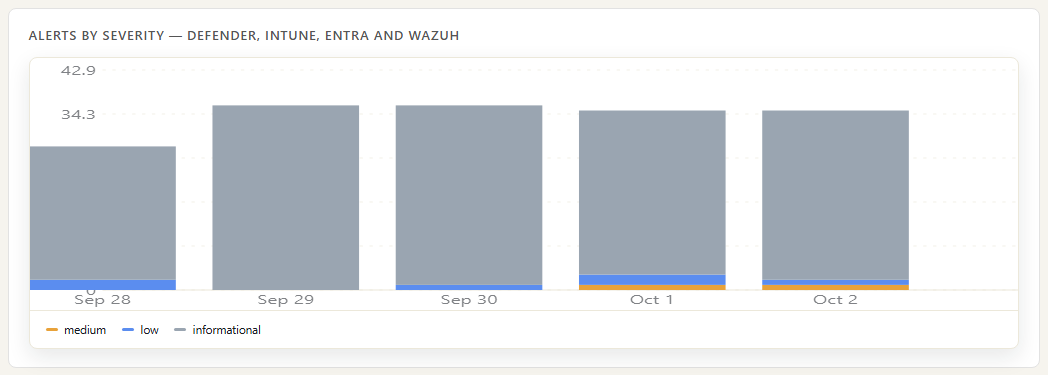
Alerts per day from Defender, Intune, Entra ID and Wazuh, mapped to one severity scale and coloured by severity. Most days are routine low-level noise; a day with higher-severity alerts is the one to open.

Four consoles, one timeline

Device compliance

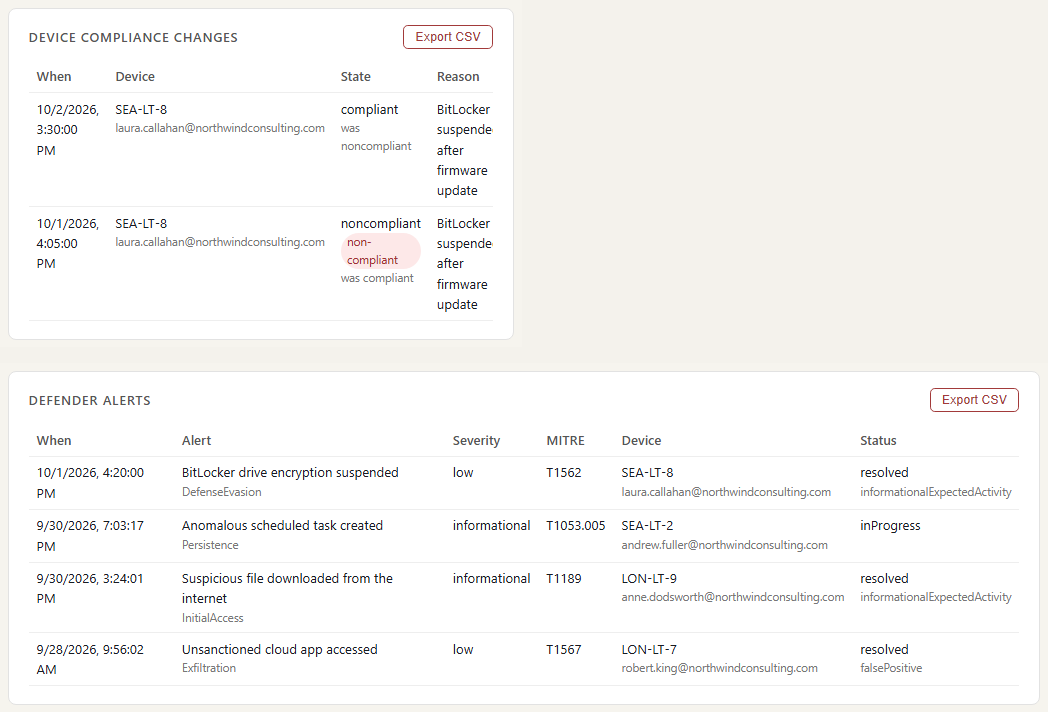
Devices that changed compliance state, from Intune. Laura's laptop went non-compliant on Thursday when BitLocker was suspended by a firmware update, with a low Defender alert alongside, and was compliant again on Friday.

Device compliance

Risky sign-ins

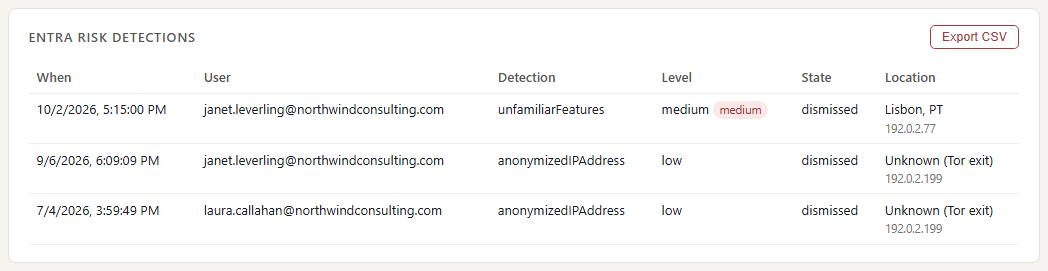
Entra ID risk detections by person, type and level, with how each was resolved. Read them next to where the person was: a detection from abroad while their badge says they were in the office deserves a question.

Risky sign-ins

Where the data comes from

Security alerts already live in several consoles. ActivityLog brings them together and puts them next to the sign-ins, changes and people around them. We take the alerts and status your security tools already produce; we do not add another agent to your devices.

Microsoft Defender for Business

What we collect

Endpoint alerts: title, severity, category, the attack technique where known, the device and user involved, and the alert's status.

How it connects

Read from Microsoft Graph with a read-only app registration approved by your Microsoft 365 admin.

Microsoft Intune

What we collect

Device compliance changes (compliant or not, encrypted or not, OS version, last check-in) and admin changes to devices and policies, with old and new values.

How it connects

The same read-only Microsoft Graph access.

Entra ID

What we collect

Sign-ins and risky sign-in detections, such as impossible travel, an unfamiliar location or an anonymous IP address, with risk level and location.

How it connects

The read-only Microsoft 365 connection, approved once by your Microsoft 365 admin. It reads Microsoft's own audit trail.

Wazuh

What we collect

Server alerts: failed and repeated logons, new local administrators, changes to watched files, failed policy checks, with the rule, severity level and server.

How it connects

Your Wazuh server forwards its alerts to a web address you create in ActivityLog, or a small collector on the server sends them.

How it works

  1. Each tool sends its alerts

    Defender, Intune, Entra ID and Wazuh keep doing the detecting. Their alerts and device status come to ActivityLog as they are raised.

  2. Tie alerts to people, devices and changes

    Each alert is matched to the person and device involved, and placed next to that person's sign-ins and their recent changes from Azure DevOps. Each tool's own severity is mapped to one scale: informational, low, medium, high.

  3. One timeline

    All four sources on one timeline, by severity and source, with device compliance and risky sign-ins alongside.

  4. Close the expected, chase the rest

    People see alerts on their own devices and accounts and explain the ones they caused. The IT lead spends time on what nobody can explain.

Questions

Does this replace our security tools?

No. Defender, Intune, Entra ID and Wazuh keep detecting and responding. ActivityLog is where their alerts meet the rest of your activity, so you can tell routine from real faster.

Will we see everything Defender sees?

You see what your licence gives you. On Microsoft 365 Business Premium that is Defender for Business alerts and device status, not the raw device activity used for threat hunting. Higher tiers give more, and we take what they give.

Do you need more access to our devices?

No new agent. We read alerts and device status your existing tools already produce, with read-only access.

Built from

  • Microsoft Defender for Business
  • Intune
  • Entra ID
  • Wazuh

See it with your own sources.

ActivityLog is in beta. Connect the tools you already use and get this report for your organisation.

See pricing →

Questions first? Talk to us → · All use cases