ActivityLog Contact us
Use cases · User activity People and time

See the whole week, not five apps' worth of fragments

ActivityLog brings the activity from Microsoft 365, your knowledge base and your delivery tools onto one timeline per person. Nobody fills anything in. The week is already there.

For you

Your weekly report, from your actual week

Writing a weekly report or a summary for your manager usually starts from memory. My week lays out what you actually did: meetings with their real length, documents, mail and delivery work, by day and by client, with hours per project. Write your summary from that. ActivityLog does not write it for you; it gives you the facts to write it from.

The week my report is built from

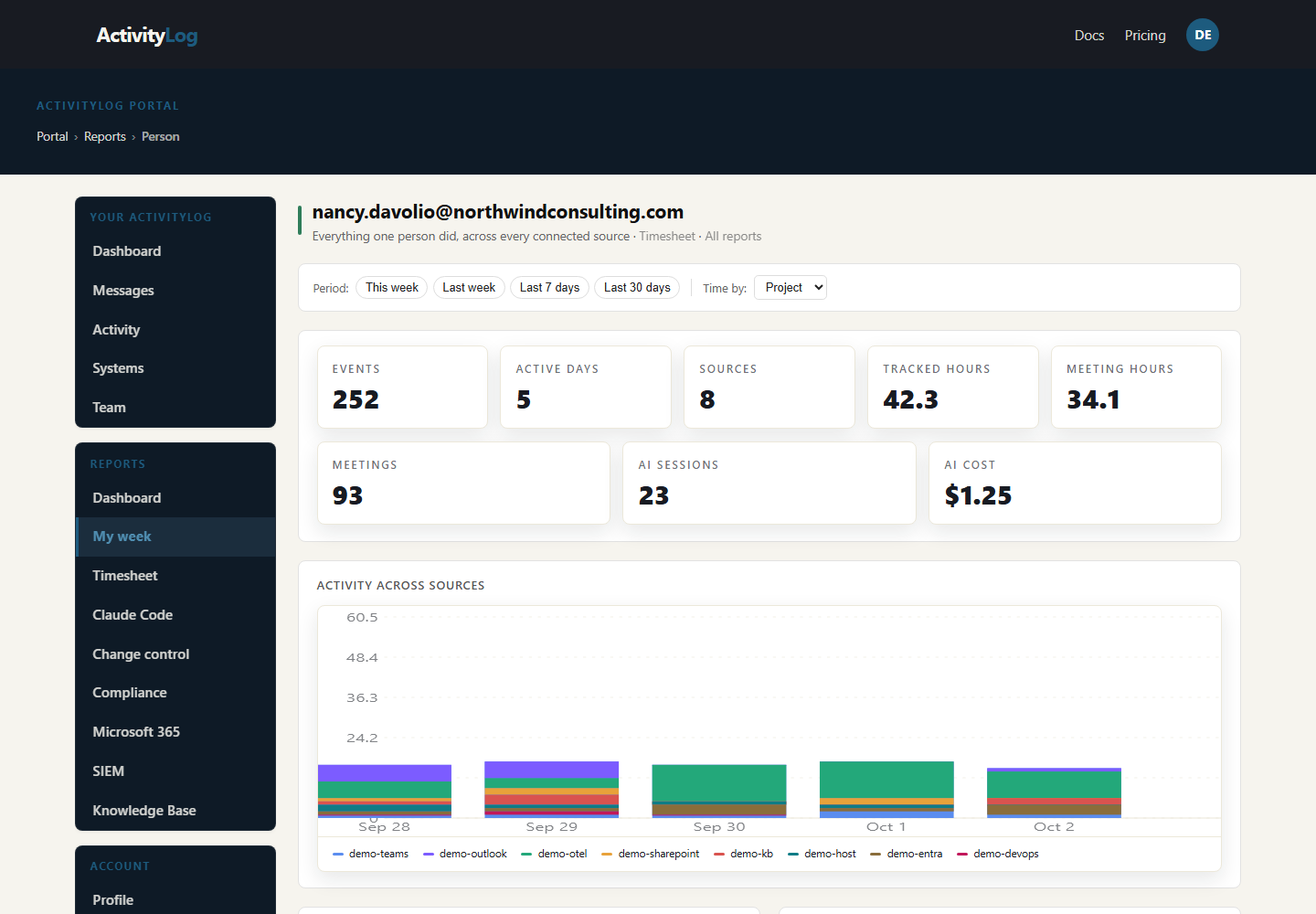
Nancy Davolio's week on one timeline, stacked by source: Teams, Outlook, SharePoint, the knowledge base and Azure DevOps. The totals underneath show where the activity came from, and the client breakdown shows the three clients she worked for: the outline of her weekly report.

The week my report is built from

Hours by project

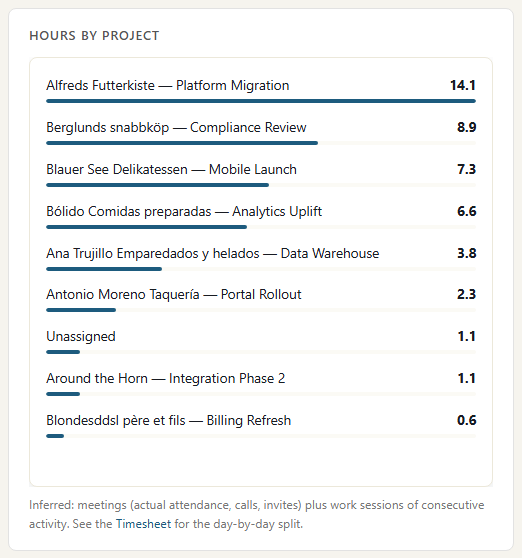
The hours panel of Nancy's My week: meeting time and work time per project for the week, from Teams attendance and from her documents, mail and delivery work grouped into blocks. It is the paragraph per client or project in her report, with the numbers already added up.

Hours by project

Meetings worth mentioning

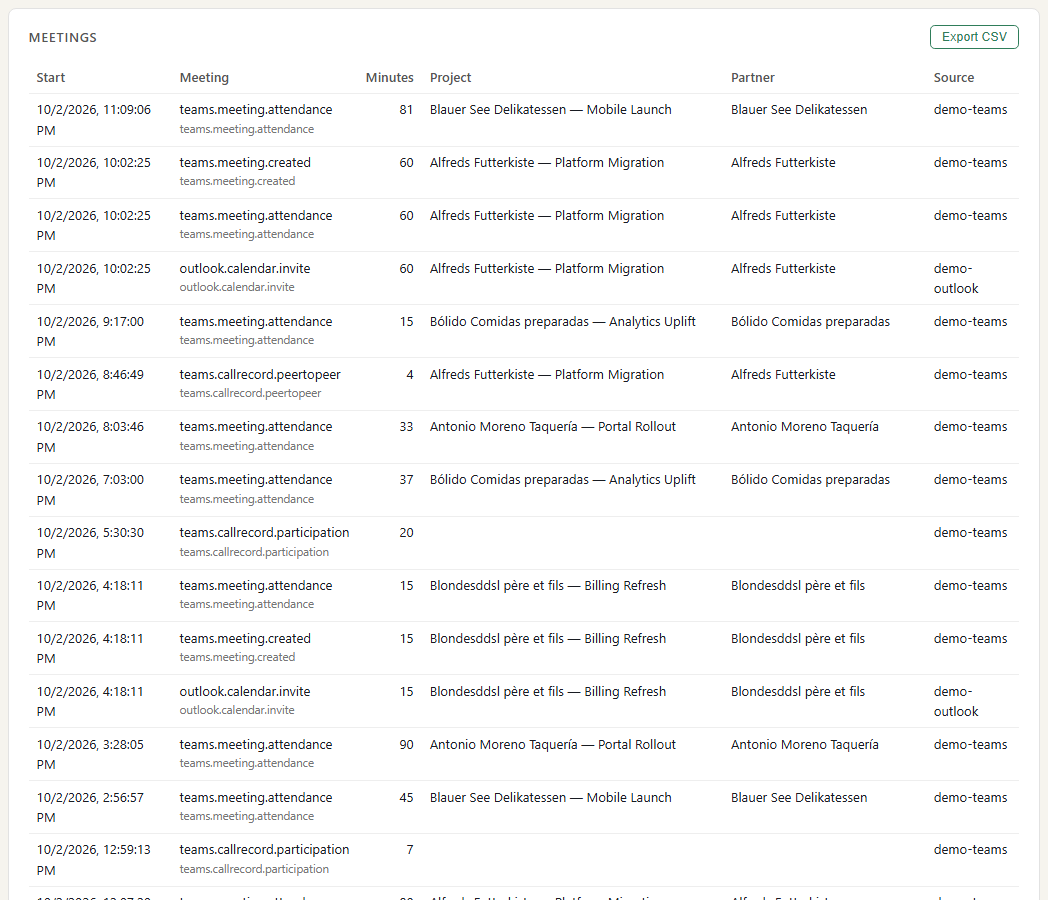
The meetings panel of Nancy's My week: each meeting's title and how long she was actually in it, from Teams attendance rather than the calendar slot. Which client calls and workshops happened, and how long they took, without opening her calendar.

Meetings worth mentioning

My week, written up for my manager

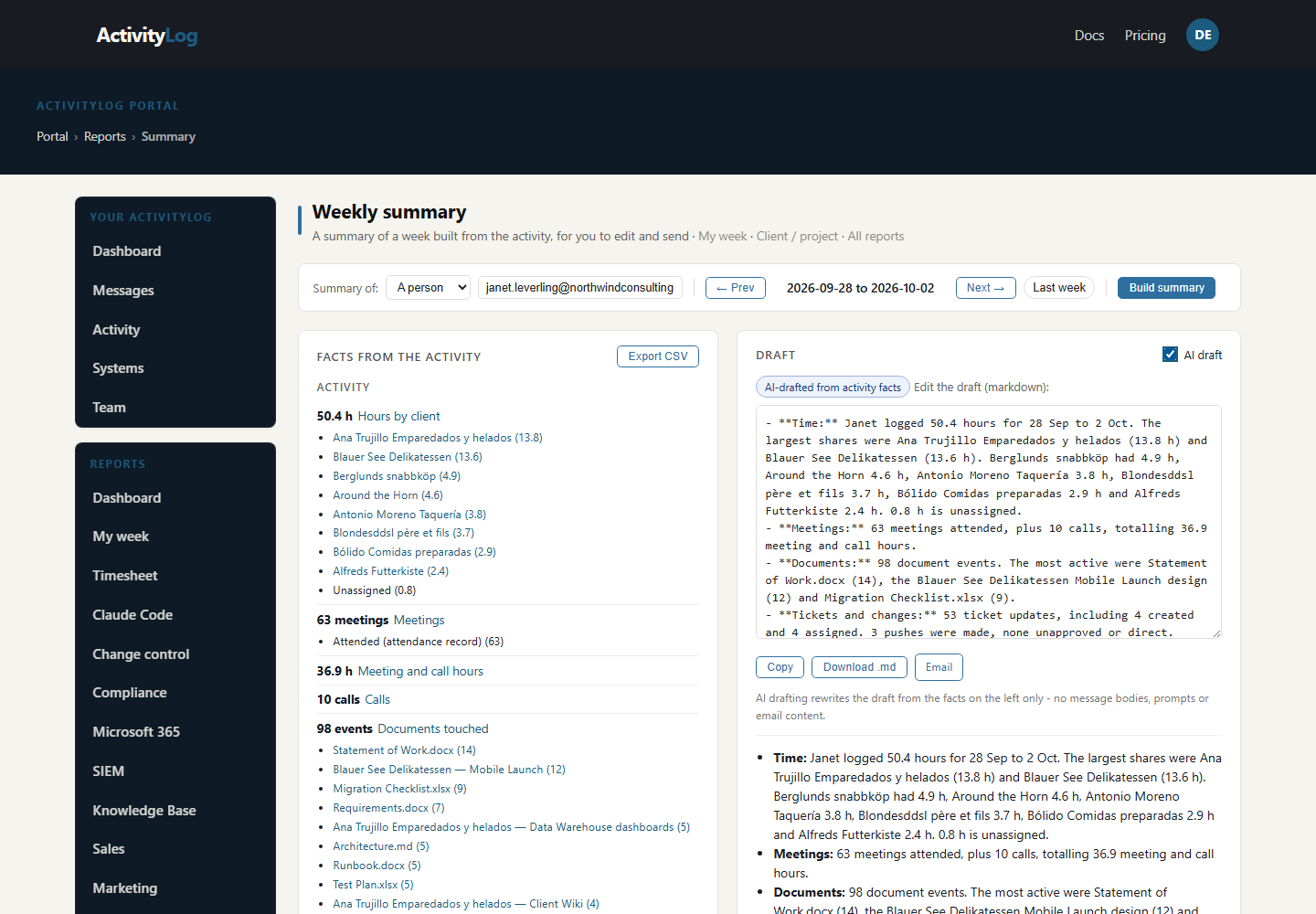
The summary writer for one person: the facts from the week and an editable draft of the weekly report, ready to copy or email.

My week, written up for my manager
For your organisation

A weekly summary for partners and the business

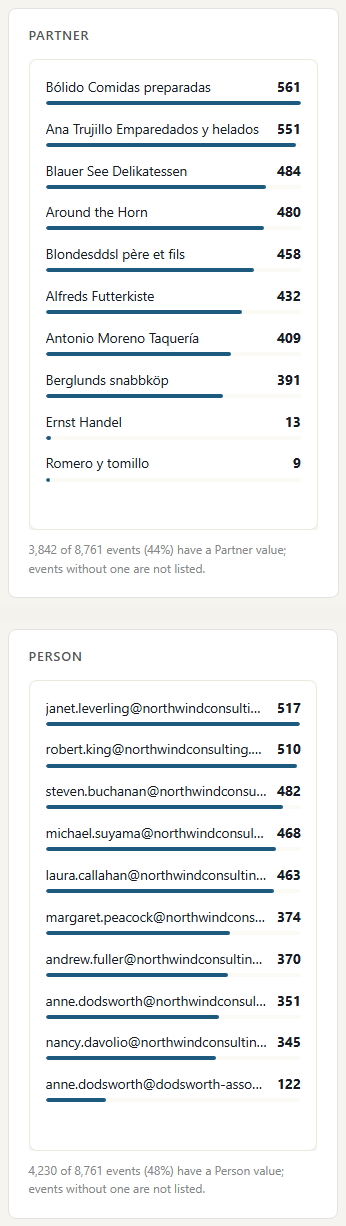
When a partner or the business asks how the week went for a client or a project, see the team's activity by client and by person, then open any one person's week for the detail. Nobody has to send you an update first.

The team's week by client, and by person

Two breakdowns of the whole team's activity for the week, from the same sources as My week: one by client and one by person. They answer the partner's first question, which clients took the team's time, and who carried the most work. To see one person's clients and hours, open their My week.

The team's week by client, and by person

One person's week, for the detail

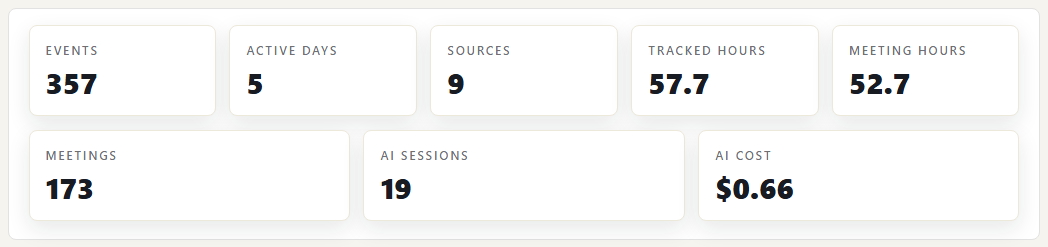
Open anyone's My week for the numbers behind the summary. Here is Steven Buchanan's week, led by meetings and meeting hours from Teams attendance records, so they count time actually spent in meetings. Over 25 hours of meetings is worth a line in the update.

One person's week, for the detail

Where the data comes from

My week is built from activity your tools already record. Nobody installs a tracker or fills in a form. We collect who did what and when, not what people wrote.

Microsoft Teams

What we collect

Meetings joined and how long each person stayed, calls with start and end times, and the fact that a chat message was sent. Not the message text.

How it connects

The read-only Microsoft 365 connection, approved once by your Microsoft 365 admin. It reads Microsoft's own audit trail. Call times come from Teams call records.

Outlook

What we collect

Mail sent and deleted, calendar items created or changed, and inbox rule changes. Never the message body.

How it connects

The same Microsoft 365 connection.

SharePoint and OneDrive

What we collect

Files opened, edited, uploaded, downloaded, deleted and shared. File names and folders, never the file content.

How it connects

The same Microsoft 365 connection.

Entra ID

What we collect

Sign-ins (succeeded, failed, multi-factor) and directory changes such as group membership and role changes.

How it connects

The same Microsoft 365 connection.

Knowledge base (Umbraco)

What we collect

Pages written, edited and read, tickets moved and comments added.

How it connects

An ActivityLog package for Umbraco sends this as it happens.

Azure DevOps

What we collect

Pull requests, code pushes, builds and releases.

How it connects

Service hooks in your Azure DevOps project send each change to a web address you create in ActivityLog. It arrives within seconds.

How it works

  1. Your tools report what happened

    Microsoft 365, Azure DevOps and your knowledge base each report who did what and when. An admin sets each one up once; people do not install anything.

  2. Match it to people and clients

    Each activity is tied to a person by their work email. A second address, such as a login at a partner company, can be added as an alias so it lands on the same person. Activity is also tied to a client by rules you set, for example a client's SharePoint site or email domain.

  3. Lay out the week

    My week puts one person's activity on a timeline, grouped by source, client and day, with meetings and their real durations listed separately.

  4. Use it

    Write the Friday status update, find what happened on Tuesday, or see across the team who has had no time for delivery work.

Questions

Do you read our email or chat messages?

No. We collect that a message was sent, a meeting attended or a file edited, with the time and the person. We do not collect email bodies, chat text or file content.

How much setup is it?

A Microsoft 365 admin approves one read-only connection. Azure DevOps takes a web address pasted into its service hooks. Microsoft 365 brings in the last 7 days on the first run, so the first week is not empty.

Is it a complete record of someone's day?

No. It shows activity in the tools you connect. Thinking, phone calls outside Teams and work in tools you have not connected do not appear. Read it as a record of what happened in your systems, not a measure of effort.

Built from

  • Microsoft Teams
  • Outlook
  • SharePoint and OneDrive
  • Entra ID
  • Knowledge base
  • Azure DevOps

See it with your own sources.

ActivityLog is in beta. Connect the tools you already use and get this report for your organisation.

See pricing →

Questions first? Talk to us → · All use cases