ActivityLog Contact us
Use cases · Compliance Security and compliance

See what leaves the company, and where sensitive data turns up

ActivityLog watches sharing in Microsoft 365 and what people paste into AI tools. It flags anonymous links, external sharing and secrets or personal data, tied to the person and the client.

For you

A heads-up before it becomes an incident

If you paste a password or a connection string into an AI tool, you find out, and nobody else reads your prompt to tell you.

My prompt findings

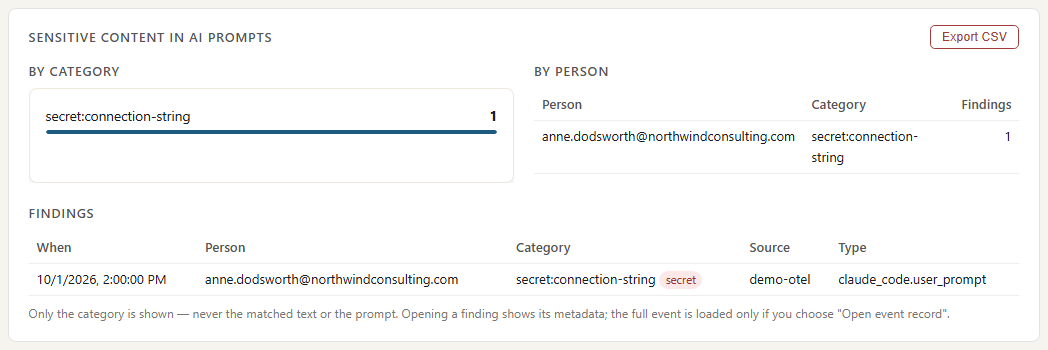
The sensitive-content panel filtered to Anne Dodsworth: one finding on Thursday, category connection string. It shows when and in which tool, not what she typed.

My prompt findings

What I shared outside

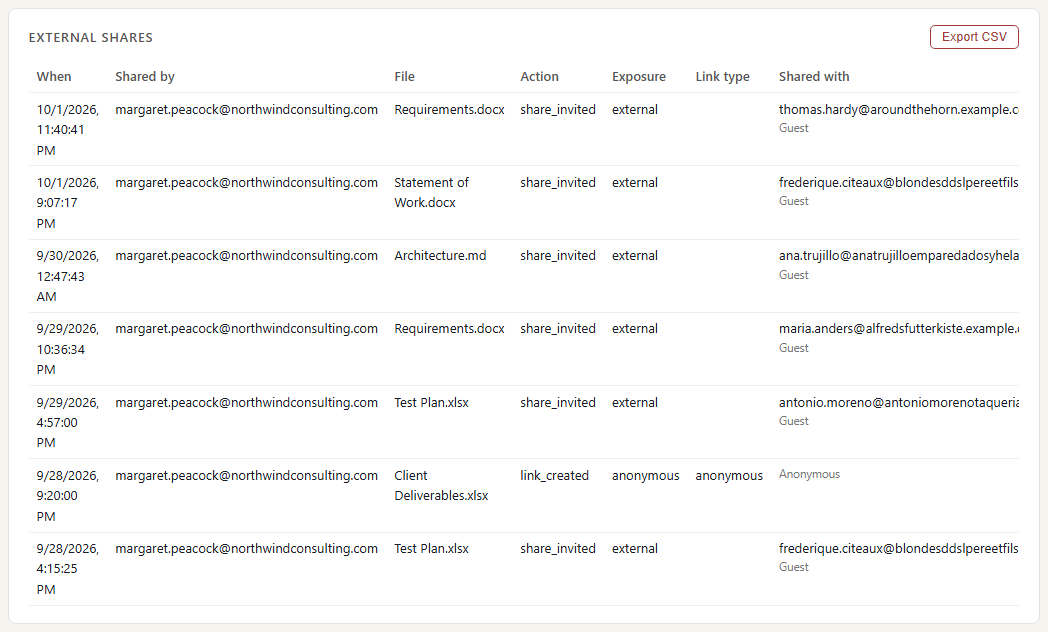
Margaret Peacock's external and anonymous shares for the week, from SharePoint and OneDrive. Monday's anonymous link to a client folder is one she can switch to a named-people link.

What I shared outside
For your organisation

One view of data leaving the building

Anonymous links, guest access and the outside domains your files go to, next to secrets and personal-data findings by category and person.

Sharing by day

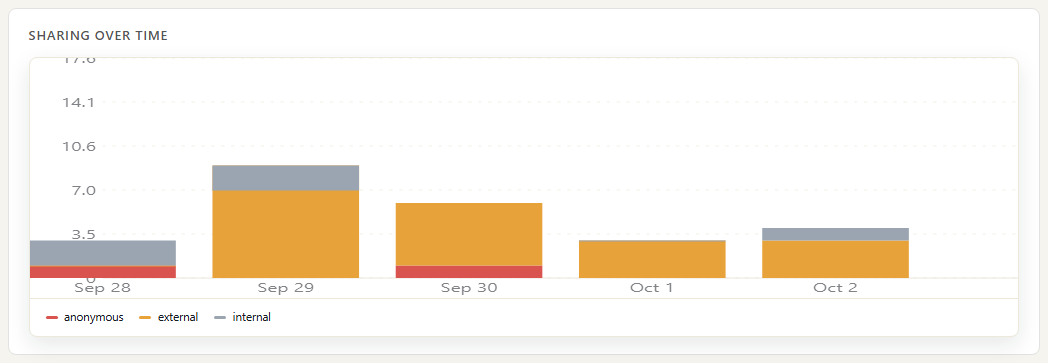
Shares per day for the showcase week, split by exposure: anonymous links anyone can open, external shares to named outside people, and internal shares, from SharePoint and OneDrive sharing activity. Monday's anonymous link to a client folder is the one to look at first.

Sharing by day

Where files go

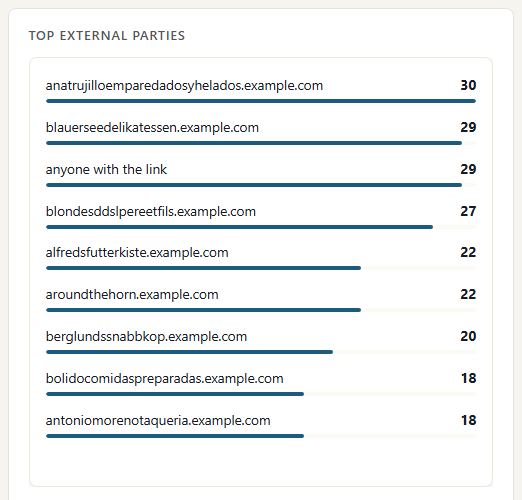
The outside domains files were shared with over the quarter, most first. The domain is taken from the recipient's address, including guest accounts. A client's domain near the top is normal; a personal email domain or one you do not recognise is worth a question.

Where files go

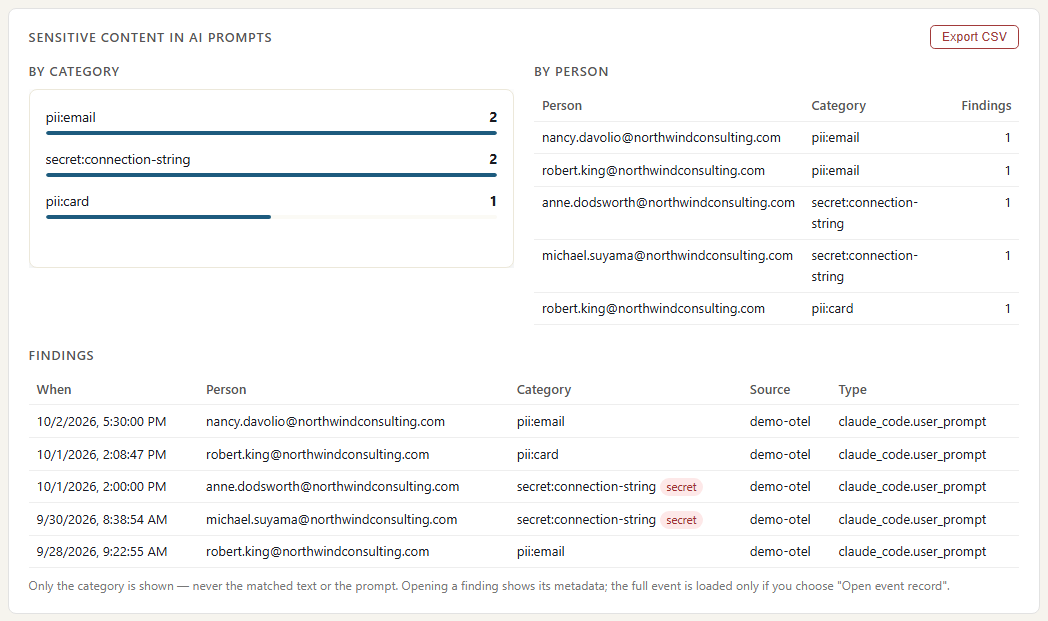
Secrets and personal data in AI prompts

Findings from the prompt scan, by category and by person. Each finding records its category, the person and the time; the prompt text is never displayed. This week Anne pasted a connection string and Nancy pasted a customer's email address.

Secrets and personal data in AI prompts

Where the data comes from

Compliance findings come from Microsoft's own record of sharing in SharePoint and OneDrive, and from a scan of AI prompts as they arrive. A finding records what kind of problem it is and who was involved, never the content.

SharePoint and OneDrive

What we collect

Sharing links created and used (anonymous, specific people, company-wide), invitations sent and accepted, guests opening or changing files, and the outside domain each file was shared with. File names, never file content.

How it connects

The read-only Microsoft 365 connection, approved once by your Microsoft 365 admin. It reads Microsoft's own audit trail.

Claude Code prompts

What we collect

When prompt sharing is turned on, each prompt is scanned for secrets (cloud and AI keys, GitHub tokens, private keys, passwords, connection strings) and personal data (email addresses, card numbers, phone numbers). We keep the category of the finding, never the matched text.

How it connects

The same Claude Code reporting used for AI usage, with prompt sharing switched on.

How it works

  1. Collect sharing and prompts

    Microsoft 365 reports every share, link and guest access. Claude Code reports prompts if you allow it.

  2. Classify and attach to people

    Each share is marked anonymous, external or internal, with the outside domain. Each prompt finding gets a category such as connection string or email address. Both are tied to the person and, where your rules match, the client.

  3. Report

    Sharing per day by exposure, top outside domains, guest file access, and findings by category and person. Prompt text is never displayed.

  4. Act

    Whoever reviews a finding can tell the person to rotate a key without reading their prompt. The compliance lead works through anonymous links and guest access by client.

Questions

Does anyone read the prompts?

No. The scan runs as the prompt arrives and keeps only the category. The Compliance page shows the time, person and category; prompt text is never displayed on any report.

Do you scan files or email?

No. We see that a file was shared, with whom and by which kind of link. We do not open files or read email. The scan covers AI prompts only.

Will it catch every secret?

No scanner does. It looks for the common shapes: cloud and AI provider keys, GitHub tokens, private keys, passwords and connection strings, access tokens, email addresses, and card and phone numbers. Treat it as a safety net, not a guarantee.

Built from

  • SharePoint and OneDrive
  • Claude Code and other AI tools

See it with your own sources.

ActivityLog is in beta. Connect the tools you already use and get this report for your organisation.

See pricing →

Questions first? Talk to us → · All use cases