ActivityLog Contact us
Use cases · Time reporting People and time

Timesheets that fill themselves

ActivityLog turns the work people already do into a draft timesheet: meetings, calls, documents and delivery, by client and by day. People review it instead of reconstructing it.

For you

Help filling in your timecard

Your hours are already sorted by client and day from what you actually did: meetings at their real length, and work blocks from your documents, mail and delivery tools. Check them, fix what needs fixing, then export them or copy them into your time system.

My timecard, drafted

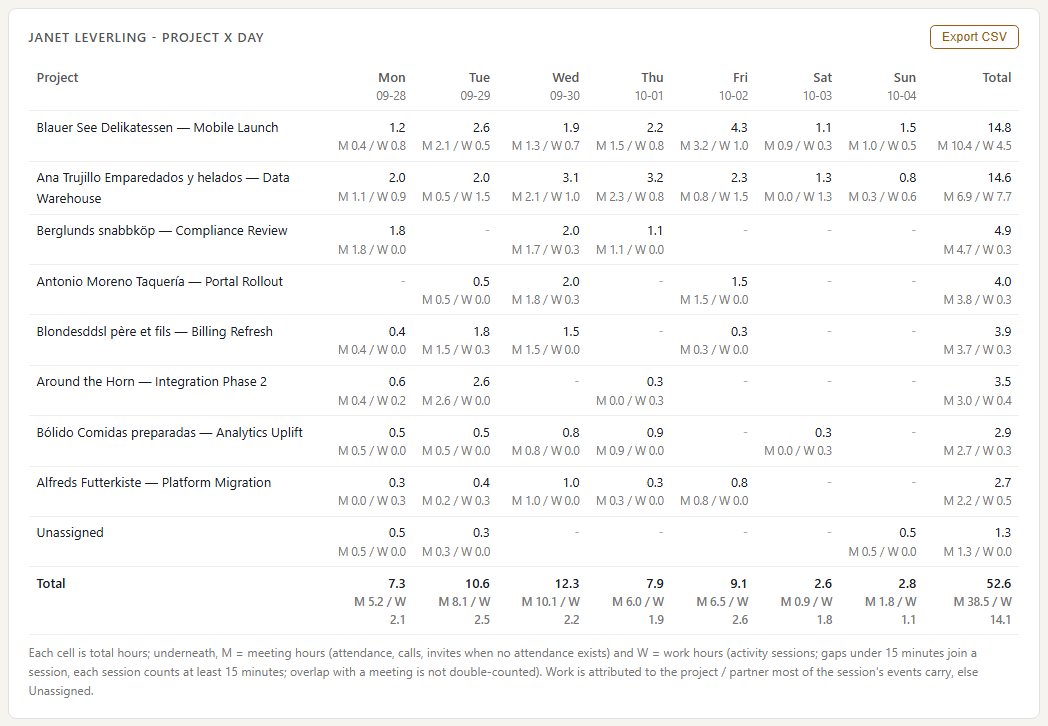
Janet Leverling's week as a grid: one row per client, one column per day, each cell showing hours split into meeting time and work time. Meeting time comes from Teams attendance; work time comes from her documents, mail and delivery activity grouped into blocks. She fills in her timecard from it, and a row marked Unassigned is activity she still has to put against a client.

My timecard, drafted
For your organisation

Check timecards, and see focus where there are none

Put the hours people entered next to the activity behind them, per person and per client, built the same way as each person's draft. Comparing the two automatically needs the timecards from your time system; support for time-system sources is coming, and until then the comparison is by hand from the export. For staff who do not keep timecards, the same hours show which clients and projects their time went to.

Timecards checked against activity

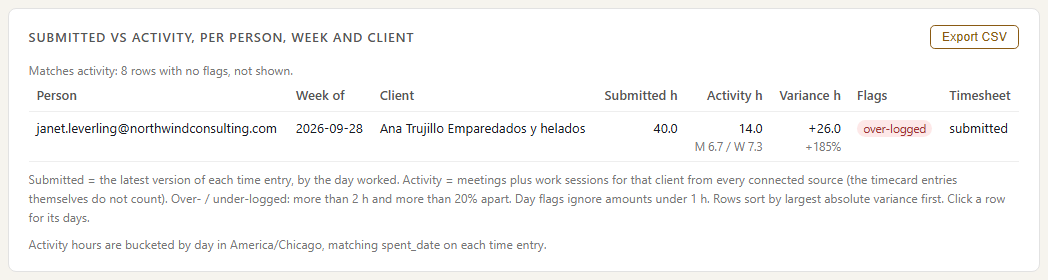
Submitted Harvest hours per person and client next to the hours their activity supports. Rows are flagged when time is logged with no activity behind it, or activity has no entry: here, Janet logged 40 hours to Ana Trujillo where her activity supports far fewer.

Timecards checked against activity

Where time went, without a timecard

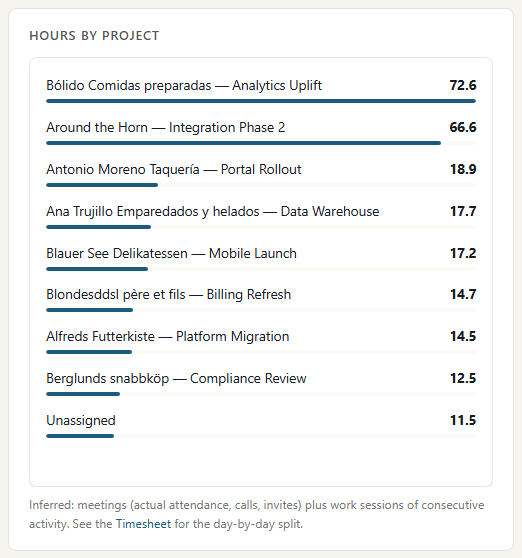
The hours panel from one person's My week over a month: meeting time and work time per project, worked out from activity. For staff who do not keep timecards, this shows which clients and projects their time went to without asking them to record it.

Where time went, without a timecard

Where the data comes from

The draft timesheet is worked out from activity, not typed in. Meetings and calls use real attendance times. Everything else is grouped into blocks of work time.

Microsoft Teams

What we collect

Meeting attendance and call records: when each person actually joined and left. Not chat or meeting content.

How it connects

The read-only Microsoft 365 connection, approved once by your Microsoft 365 admin. It reads Microsoft's own audit trail. Call times come from Teams call records.

Outlook

What we collect

Calendar items and mail sent, with times. Never the message body.

How it connects

The same Microsoft 365 connection.

SharePoint and OneDrive

What we collect

Files edited, uploaded and shared, with the site they sit in, which often tells us the client. Never the file content.

How it connects

The same Microsoft 365 connection.

Azure DevOps

What we collect

Pull requests, pushes, builds and work items, with the repository and project.

How it connects

Service hooks in your Azure DevOps project send each change to a web address you create in ActivityLog. It arrives within seconds.

Knowledge base (Umbraco)

What we collect

Pages edited, tickets worked on and comments, with the client or product they belong to.

How it connects

An ActivityLog package for Umbraco sends this as it happens.

How it works

  1. Collect the work that already happened

    Meetings, calls, documents, mail and delivery work arrive from the tools people already use. Nobody starts a timer.

  2. Assign it to a person and a client

    Each activity is tied to a person by their work email. A second address, such as a login at a partner company, can be added as an alias so it lands on the same person. Client assignment comes from rules you set, such as a client's SharePoint site, email domain or project.

  3. Turn activity into hours

    Meetings and calls count for the time the person was actually in them. Other activity is grouped into work blocks: anything less than 15 minutes apart is one block, and each block counts at least 15 minutes. Reading mail and signing in are left out.

  4. Review and export

    Each person checks their draft, fixes what needs fixing and exports CSV for billing or payroll. Admins see hours per client and person across the team.

Questions

How accurate are the hours?

Meeting and call hours are exact, from attendance records. Work hours are an estimate built from activity: time spent thinking or on paper is missing, and a burst of quick edits is rounded up to 15 minutes. That is why it is a draft that people review, not a final timesheet.

What happens to work with no client?

It shows as Unassigned. Add a rule, for example a client's SharePoint site or email domain, and that work is assigned from then on, including older activity.

Can people see each other's timesheets?

Each person sees their own. Team totals by person and client are for admins and auditors only.

Built from

  • Microsoft Teams
  • Outlook
  • SharePoint and OneDrive
  • Azure DevOps
  • Knowledge base

See it with your own sources.

ActivityLog is in beta. Connect the tools you already use and get this report for your organisation.

See pricing →

Questions first? Talk to us → · All use cases